BioacousticAnnotator allows the user to configure almost every aspect of the app. Here we focus on the most minimal configurations for: a player, data collection, and model review. Each configuration below passes paramters directly to BioacousticAnnotator. Using a config file, rather than passing parameters directly will help produce cleaner, more reproducible workflows. Section 3 shows basic configuration files for the examples in section 2. See the Bioacoustic Annotators Examples Notebook for a more advanced/realistic configurations.
Author: Brookie Guzder-Williams (bguzder-williams@berkeley.edu)
Affiliation: The Eric and Wendy Schmidt Center for Data Science & Environment
Website: https://dse.berkeley.edu/
License: BSD 3-Clause
For configuration options and advanced usage see the documentation and the geo-analysis example.
from jupyter_bioacoustic import BioacousticAnnotator, print_md

DATA = 'data/detections.N-dse.csv'
AUDIO = 'audio_url'
CATEGORIES = 'data/species_counts.N-dse.csv'
[JBA] Debug mode enabled. Logs → /Users/brookie/code/dse/jupyter_bioacoustic/repos/jupyter_bioacoustic/demo/jba_debug.log
1. Player / Visualizar
Browse audio clips and view spectrograms — no form, no data collection. Useful for exploration and quality checks.
ba = BioacousticAnnotator(data=DATA, audio=AUDIO)
ba.open()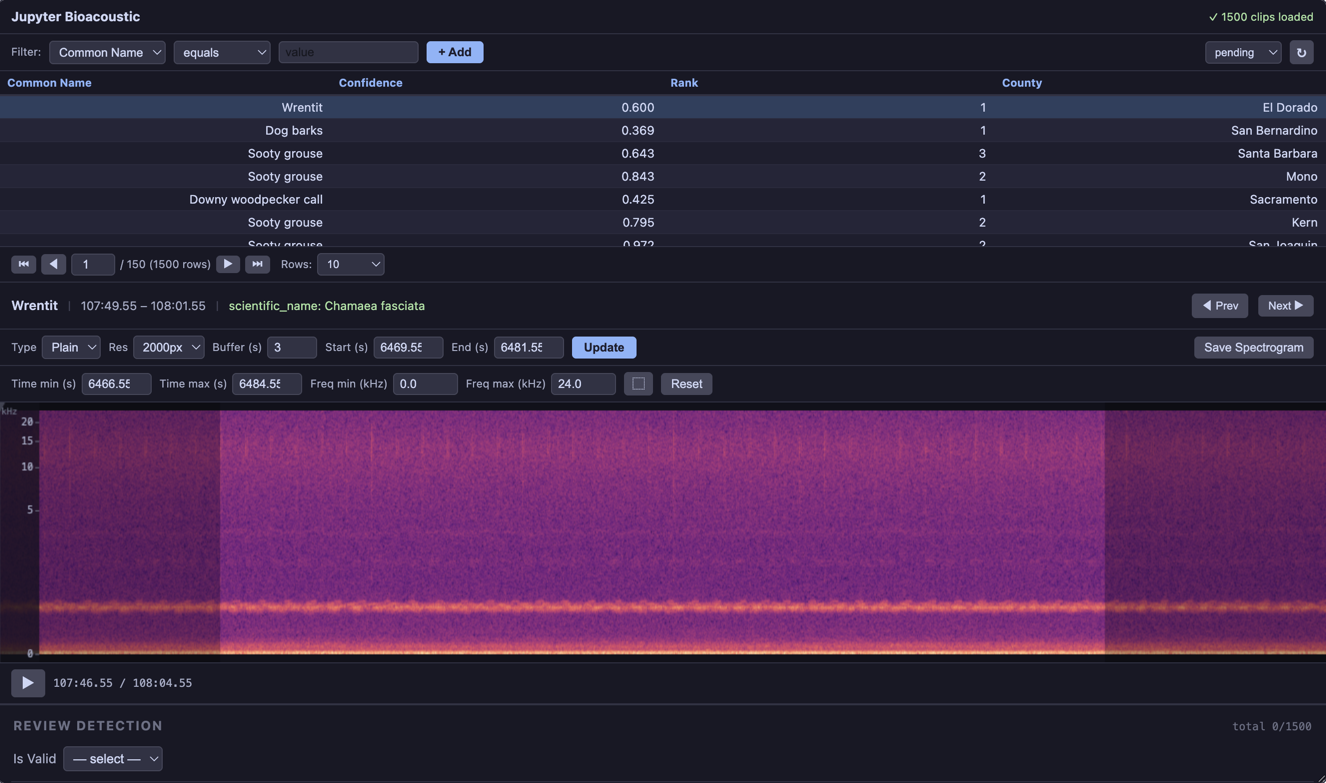
2. Simple Forms
Here we show two simple forms created by passing a dictionary to the form_config:
Data Collection: a simple form requiring the user to select a species for the clip
Model Review: the user is first asked if the model prediction is valid. if they select yes, the user may submit their response. If the user selects no, they must select what speicies is contained in the clip.
Note: form_config also accepts a path to yaml file. form_config may also be passed directly in a config-file (see bioacoustic
2.a Data Collection
Our only form element in this example is a select dropdown. This example uses the following parameters:
label: display label; used as column name if column is omittedcolumn: column written to output file (defaults to label)required: if true, submit button is disabled until value is setitems: theitemselements can take several formats, lists of strings or dicts for example. in this case we specifiy a path to a CSV and the column in the CSV to popluate the list with.
Additionally, Now that we are collecting data we need to be able to associate it with the selected row in the clip table. to do this we need to define a data_index_column, the id-column in the source dataset. and output_index_column, the associated id-column in the output dataset (this will default to data_index_column.
BioacousticAnnotator(
    data=DATA,
    audio=AUDIO,
    display_columns=['common_name', 'common_name', 'confidence'],
    data_index_column='id',
    output_index_column='detection_id',
    form_config={
        'select': {
            'label': 'species',
            'column': 'common_name',
            'required': True,
            'items': {
                'path': CATEGORIES,
                'value': 'common_name',
            },
        },
    },
).open()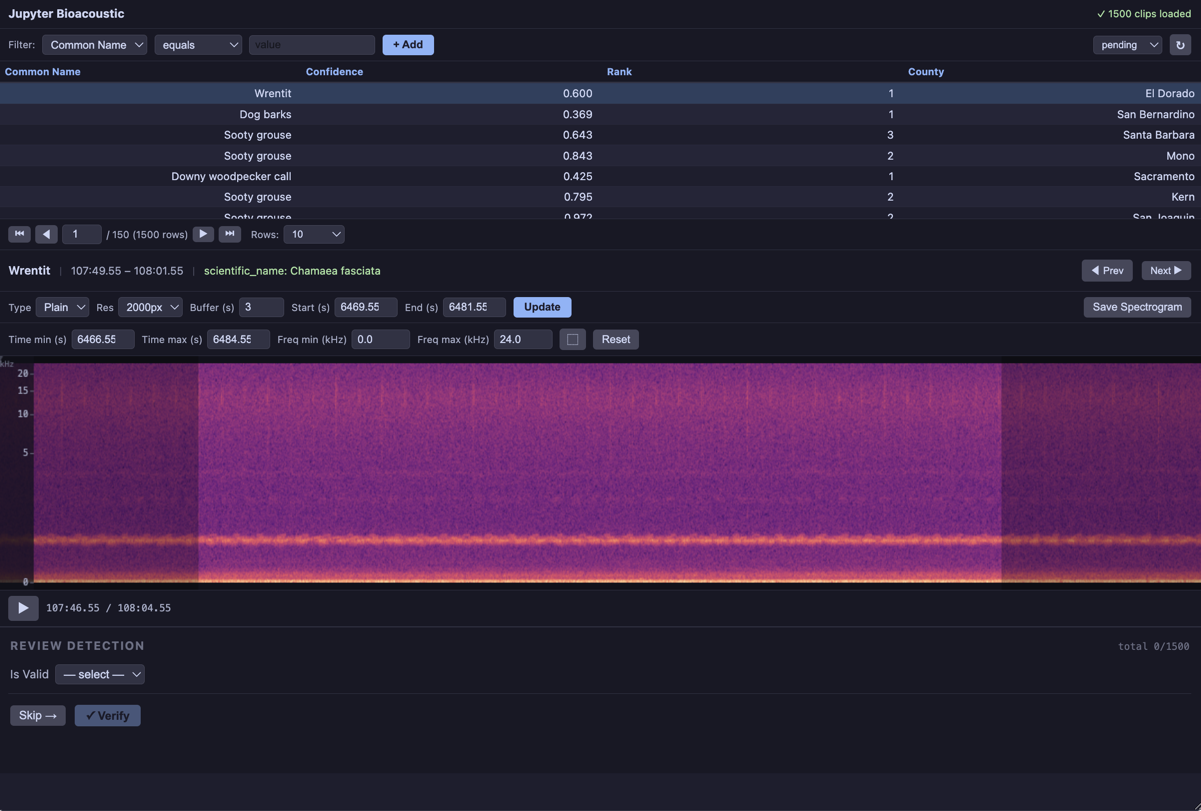
2.b Model Review
The form in this example in includes two elements: a “is valid” select-box, and an additional form (containing a single select-box) If the user chooses that the model has incorrectly identified the species.
Note that the correction_form select-box is similar to above with some additional elements under select.items. Namely:
filter_box:(bool)if set to true an additional textbox appears next to the dropdown that allows the user to filter through options. This can be extremely useful when there are 100s of speicies to choose fromnot_available:(bool|str)if truthy adds an additonal “not_available” value (in this case “Unknown Species”) to the listused a
[[]]-templateto included the predictedcommon_namein the select label
BioacousticAnnotator(
    data=DATA,
    audio=AUDIO,
    display_columns=['common_name', 'confidence'],
    data_index_column='id',
    output_index_column='detection_id',
    form_config={
        'select': {
            'label': 'Is [[common_name]] Valid',
            'column': 'is_valid',
            'required': True,
            'items': [
                { 'value': 'yes'},
                { 'value': 'no', 'form': 'correction_form'},
            ],
        },
        'dynamic_forms': {
            'correction_form': [
                {'select': {
                    'label': 'corrected species',
                    'column': 'corrected_common_name',
                    'items': {
                        'path': CATEGORIES,
                        'value': 'common_name',
                        'required': True,
                        'filter_box': True,
                        'not_available': 'Unknown Species',
                    },
                }},
            ],
        }
    },
).open()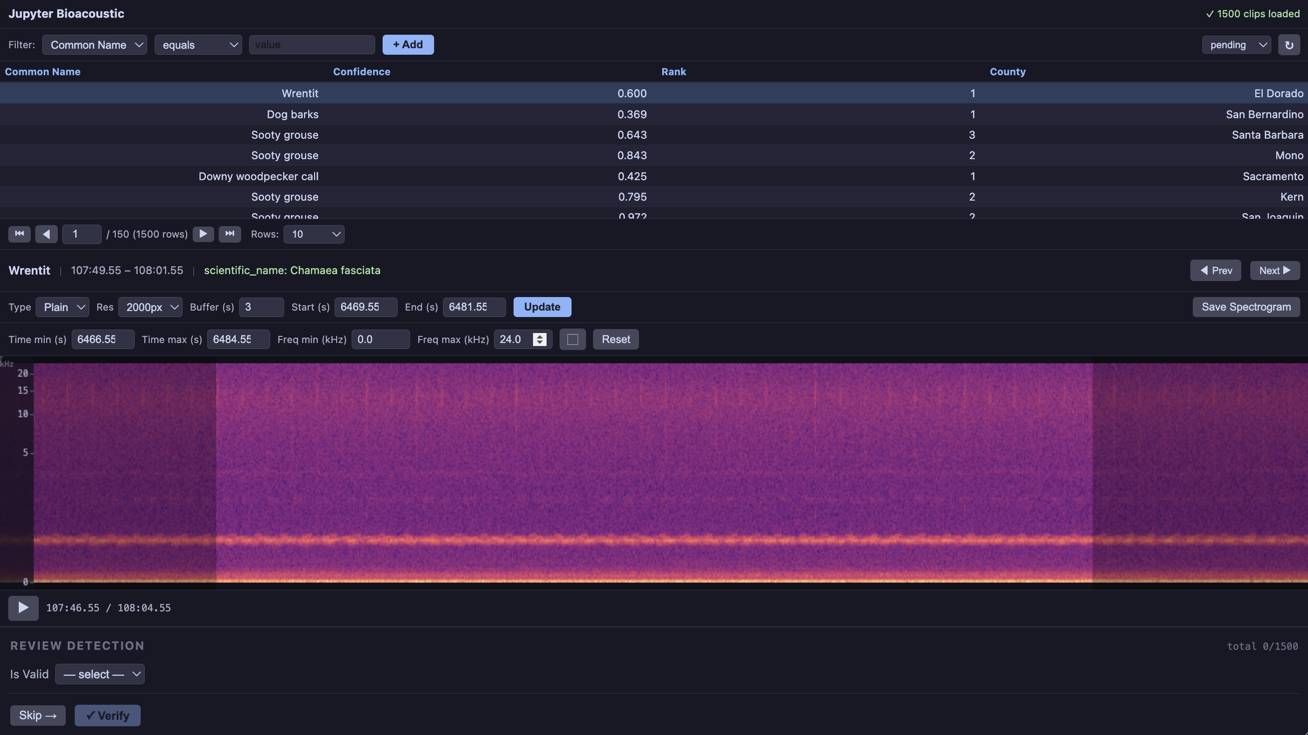
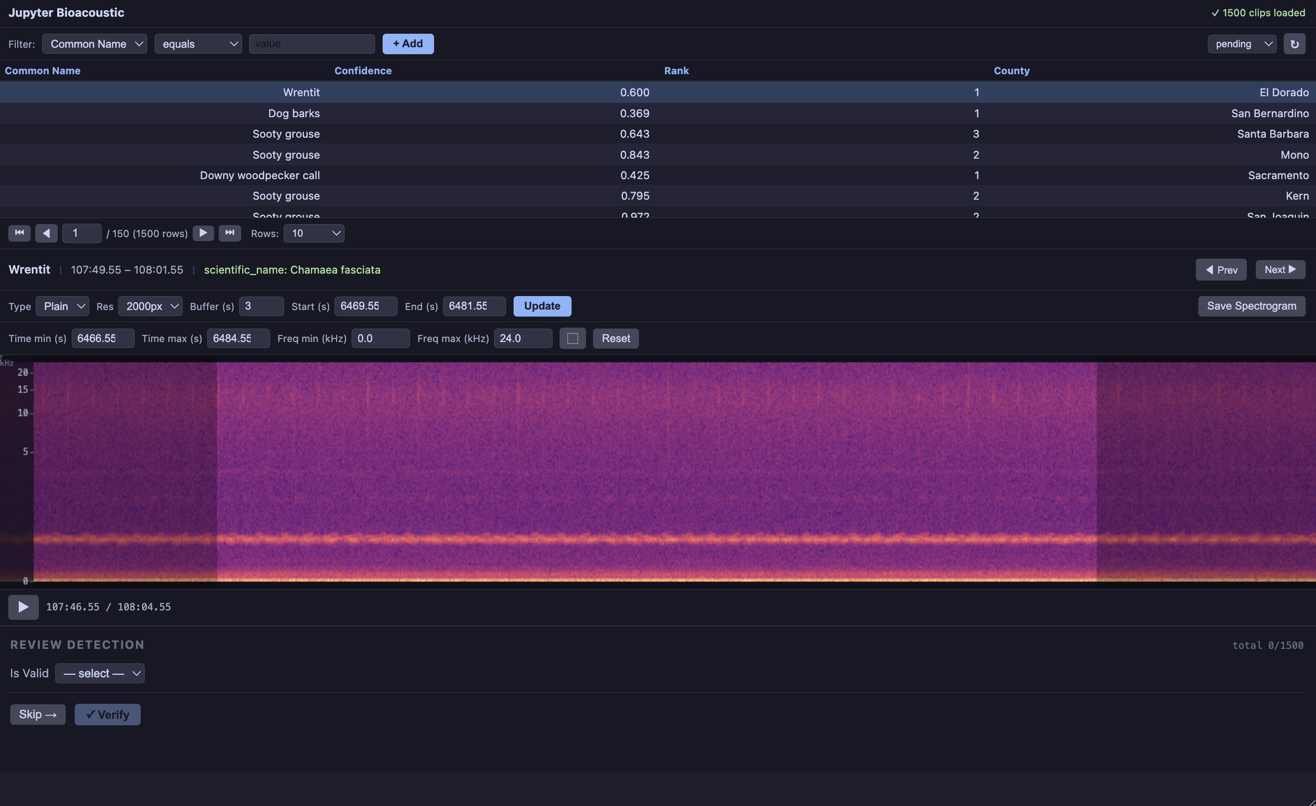
3.a form_config example
ba = BioacousticAnnotator(
    data=DATA,
    audio=AUDIO,
    display_columns=['common_name', 'scientific_name', 'confidence', 'rank'],
    data_index_column='id',
    output_index_column='detection_id',
    form_config='annotator_config/forms/simple-examples-3.yaml'
)
ba.describe()- Form: annotator_config/forms/simple-examples-3.yaml
audio: audio_url
data:
  index_column: id
  path: data/detections.N-dse.csv
display_columns:
- common_name
- scientific_name
- confidence
- rank
form_config:
  dynamic_forms:
  - confirmed_form:
    - select:
        column: reviewer_confidence
        items:
        - low
        - medium
        - high
        label: confidence
    - textbox:
        column: notes
        label: notes
  - rejected_form:
    - select:
        column: corrected_common_name
        items:
          custom_value: true
          filter_box: true
          not_available:
            label: Unknown Species
            value: unknown
          path: data/species_counts.N-dse.csv
          value: common_name
        label: corrected species
        required: true
    - select:
        column: rejection_reason
        items:
        - noise
        - wrong species
        - overlapping signals
        - too faint
        - other
        label: rejection reason
        required: true
    - number:
        column: signal_quality
        label: signal quality (1-5)
        max: 5
        min: 1
        step: 1
    - checkbox:
        column: flagged
        label: flag for expert review
    - textbox:
        column: notes
        label: notes
        multiline: true
  form:
  - select:
      column: is_valid
      items:
      - form: confirmed_form
        label: 'yes'
        value: 'yes'
      - form: rejected_form
        label: 'no'
        value: 'no'
      label: Is Valid
      required: true
  pass_value:
    column: detection_id
    source_column: id
  submission_buttons:
    line: true
    next:
      label: Skip
    submit:
      label: Verify
  title:
    progress_tracker: true
    value: REVIEW DETECTION
ba.open()3.b config example
The advantage to config over form_config is that you can pass the full range of parameters to BioacousticAnnotator. Note however, in this example we are passing only form_config. You can dive deeper into the full set of parameters here. We have kept data and audio as inline params, since this would allow a user to use the same config for multiple different data and audio values.
ba = BioacousticAnnotator(
    data=DATA,
    audio=AUDIO,
    config='annotator_config/config/simple-examples-3.yaml'
)
ba.describe()- Config: annotator_config/config/simple-examples-3.yaml
- Form: annotator_config/forms/simple-examples-3.yaml
audio: audio_url
capture: Save Spectrogram
capture_dir: spectrograms
data:
index_column: id
path: data/detections.N-dse.csv
display_columns:
- common_name
- scientific_name
- confidence
- rank
form_config:
dynamic_forms:
- confirmed_form:
- select:
column: reviewer_confidence
items:
- low
- medium
- high
label: confidence
- textbox:
column: notes
label: notes
- rejected_form:
- select:
column: corrected_common_name
items:
custom_value: true
filter_box: true
not_available:
label: Unknown Species
value: unknown
path: data/species_counts.N-dse.csv
value: common_name
label: corrected species
required: true
- select:
column: rejection_reason
items:
- noise
- wrong species
- overlapping signals
- too faint
- other
label: rejection reason
required: true
- number:
column: signal_quality
label: signal quality (1-5)
max: 5
min: 1
step: 1
- checkbox:
column: flagged
label: flag for expert review
- textbox:
column: notes
label: notes
multiline: true
form:
- select:
column: is_valid
items:
- form: confirmed_form
label: 'yes'
value: 'yes'
- form: rejected_form
label: 'no'
value: 'no'
label: Is Valid
required: true
pass_value:
column: detection_id
source_column: id
submission_buttons:
line: true
next:
label: Skip
submit:
label: Verify
title:
progress_tracker: true
value: REVIEW DETECTION
info_card_text: 'scientific_name: [[scientific_name]]'
info_card_title: '[[common_name]]'
output:
index_column: detection_id
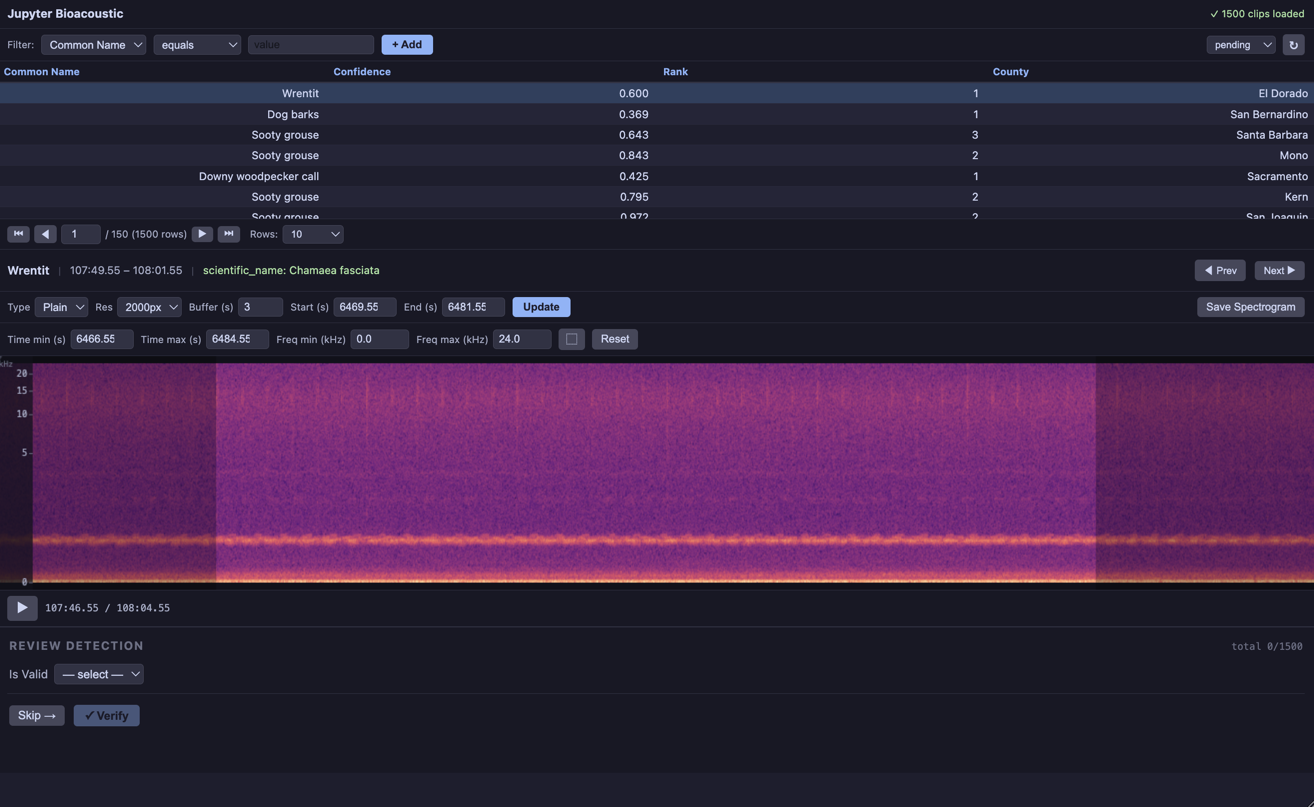
ba.open()3.c project example
A project configuration is similar to config except it must include all required fields (ie data.{path|uri|..., ident_column}, audio.{path|...}) and you can pass a config path to be loaded.
print_md((
"Here we will try and load the same config file from the previous example directly as a project. "
"Loading will fail because the project is not fully specified"
))
try:
BioacousticAnnotator(project='annotator_config/config/simple-examples-3.yaml')
except Exception as e:
print_md('---')
print('ERROR:', e)
print_md('---')ERROR: data dict must have exactly one of {'uri', 'sql', 'path', 'api', 'url'}, got: none
ba = BioacousticAnnotator('annotator_config/projects/simple-examples-3.yaml')
ba.describe()- Project: annotator_config/projects/simple-examples-3.yaml
- Config: annotator_config/config/simple-examples-3.yaml
- Form: annotator_config/forms/simple-examples-3.yaml
audio:
  column: audio_url
capture: Save Spectrogram
capture_dir: spectrograms
data:
  index_column: id
  path: data/detections.N-dse.csv
display_columns:
- common_name
- scientific_name
- confidence
- rank
form_config:
  dynamic_forms:
  - confirmed_form:
    - select:
        column: reviewer_confidence
        items:
        - low
        - medium
        - high
        label: confidence
    - textbox:
        column: notes
        label: notes
  - rejected_form:
    - select:
        column: corrected_common_name
        items:
          custom_value: true
          filter_box: true
          not_available:
            label: Unknown Species
            value: unknown
          path: data/species_counts.N-dse.csv
          value: common_name
        label: corrected species
        required: true
    - select:
        column: rejection_reason
        items:
        - noise
        - wrong species
        - overlapping signals
        - too faint
        - other
        label: rejection reason
        required: true
    - number:
        column: signal_quality
        label: signal quality (1-5)
        max: 5
        min: 1
        step: 1
    - checkbox:
        column: flagged
        label: flag for expert review
    - textbox:
        column: notes
        label: notes
        multiline: true
  form:
  - select:
      column: is_valid
      items:
      - form: confirmed_form
        label: 'yes'
        value: 'yes'
      - form: rejected_form
        label: 'no'
        value: 'no'
      label: Is [[common_name]] Valid?
      required: true
  pass_value:
    column: detection_id
    source_column: id
  submission_buttons:
    line: true
    next:
      label: Skip
    submit:
      label: Verify
  title:
    progress_tracker: true
    value: REVIEW DETECTION
info_card_text: 'scientific_name: [[scientific_name]]'
info_card_title: '[[common_name]]'
output:
  index_column: detection_id
ba.open()