Convert geospatial data to Josh’s optimized .jshd format
Introduction
Josh simulations can incorporate external geospatial data like climate projections, soil maps, or elevation models. Before use, this data must be preprocessed into Josh’s optimized .jshd (Josh Data) format.
Preprocessing does several things:
Spatial alignment: Resamples data to match your simulation grid
Temporal alignment: Maps time steps between data and simulation
Binary optimization: Creates fast-loading binary format
Supported Input Formats
Josh supports three input formats, each with a dedicated config class:
Format
Config Class
Use Case
NetCDF
NetcdfPreprocessConfig
Climate projections, gridded data with time dimension
GeoTIFF/COG
GeotiffPreprocessConfig
Satellite imagery, elevation models, land cover maps
CSV
CsvPreprocessConfig
Point observations, station data
This tutorial demonstrates:
Creating synthetic test data with clear spatial patterns
Preprocessing NetCDF files using NetcdfPreprocessConfig
Preprocessing GeoTIFF files using GeotiffPreprocessConfig
Preprocessing CSV files using CsvPreprocessConfig
Verifying preprocessed data with load_jshd()
Prerequisites: joshpy installed with pip install joshpy[all]
Step 1: Create Synthetic Test Data
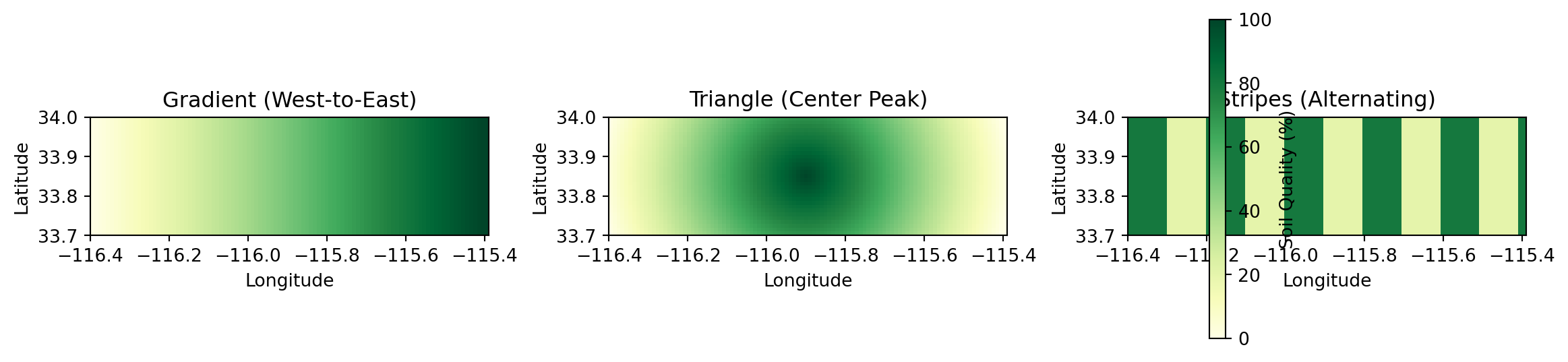
For this tutorial, we create synthetic soil quality data with three distinct spatial patterns. These patterns make it easy to verify that preprocessing works correctly and that simulations respond to external data as expected.
The Patterns
We’ll create three NetCDF files:
Pattern
Description
Expected Effect
Gradient
Soil quality increases west-to-east (0% to 100%)
Trees grow taller in the east
Triangle
Peak quality in center, decreasing to edges
Trees tallest in center
Stripes
Alternating bands of 20% and 80% quality
Bands of short and tall trees
Grid Specification
Our synthetic data matches the tutorial simulation grid:
Extent: 33.7-34.0° latitude, -116.4 to -115.4° longitude
Figure 1: Synthetic soil quality patterns for preprocessing
Step 2: Preprocess NetCDF with JoshCLI
The cli.preprocess() method converts geospatial data to Josh’s .jshd format. It requires a reference simulation to define the target grid.
Reference Simulation
The preprocessing command needs a Josh simulation file to know the target grid:
from pathlib import PathSOURCE_PATH = Path("../../examples/external_sweep.josh")print(SOURCE_PATH.read_text())
# External data sweep simulation - tree growth affected by soil quality
# Demonstrates using external geospatial data in Josh simulations
#
# The `external soil_quality` expression reads preprocessed .jshd data
# that varies spatially across the grid. Tree growth rate scales with
# soil quality, creating visible spatial patterns in the output.

start simulation Main

  # Grid extent for the tutorial area
  # Note: grid.low = northwest corner (higher lat, lower lon)
  #       grid.high = southeast corner (lower lat, higher lon)
  grid.size = 1000 m
  grid.low = 34.0 degrees latitude, -116.4 degrees longitude
  grid.high = 33.7 degrees latitude, -115.4 degrees longitude
  grid.patch = "Default"

  # 10 timesteps to observe growth patterns
  steps.low = 0 count
  steps.high = 10 count

  # Output exports to files (run_hash passed as custom-tag by joshpy)
  exportFiles.patch = "file:///tmp/external_sweep_{run_hash}_{replicate}.csv"

end simulation

start patch Default

  # Create trees in each patch
  ForeverTree.init = create 10 count of ForeverTree

  # Read soil quality from external preprocessed data
  # This value varies spatially based on the .jshd file content
  soil_quality.step = external soil_quality

  # Export patch-level averages
  export.average_height.step = mean(ForeverTree.height)
  export.average_age.step = mean(ForeverTree.age)
  export.soil_quality.step = soil_quality

end patch

start organism ForeverTree

  age.init = 0 year
  age.step = prior.age + 1 year

  height.init = 0 meters

  # Growth rate scales with soil quality from external data
  # 0% soil quality -> 0 meters max growth
  # 100% soil quality -> 10 meters max growth
  max_growth.step = map here.soil_quality from [0 percent, 100 percent] to [0 meters, 10 meters] linear

  # Actual growth is random up to max_growth
  height.step = prior.height + sample uniform from 0 meters to max_growth

end organism

start unit year

  alias years
  alias yr
  alias yrs

end unit
Preprocess Each Pattern
The output filename determines how Josh resolves external references. For example, soil_quality_gradient.jshd will be referenced as external soil_quality when passed with --data soil_quality=soil_quality_gradient.jshd.
from pathlib import Pathfrom joshpy.cli import JoshCLI, NetcdfPreprocessConfigfrom joshpy.jar import JarMode# Setup CLI (auto-downloads JAR if needed)cli = JoshCLI(josh_jar=JarMode.DEV)SOURCE_PATH = Path("../../examples/external_sweep.josh")DATA_DIR = Path("../../examples/external_data")# Patterns to preprocesspatterns = ["gradient", "triangle", "stripes"]for pattern in patterns: nc_file = DATA_DIR /f"soil_quality_{pattern}.nc" jshd_file = DATA_DIR /f"soil_quality_{pattern}.jshd"print(f"Preprocessing {nc_file.name}...") result = cli.preprocess(NetcdfPreprocessConfig( script=SOURCE_PATH, simulation="Main", data_file=nc_file, variable="soil_quality", units="percent", output=jshd_file, x_coord="lon", y_coord="lat", time_coord="time", parallel=True, # Enable parallel processing for faster preprocessing ))if result.success:print(f" -> {jshd_file.name} created successfully")else:raiseRuntimeError(f"Preprocessing failed for {nc_file.name}: {result.stderr}")
Preprocessing soil_quality_gradient.nc...
  -> soil_quality_gradient.jshd created successfully
Preprocessing soil_quality_triangle.nc...
  -> soil_quality_triangle.jshd created successfully
Preprocessing soil_quality_stripes.nc...
  -> soil_quality_stripes.jshd created successfully
TipParallel Preprocessing
The parallel=True option enables parallel processing of grid patches, providing approximately Nx speedup on machines with N CPU cores. This is especially beneficial for large grids or when preprocessing many files. For small grids like this tutorial example, the overhead may outweigh the benefit, but for production-scale data it can significantly reduce preprocessing time.
NetcdfPreprocessConfig Options
Parameter
Description
script
Josh simulation file (defines target grid)
simulation
Name of simulation to use
data_file
Input NetCDF file (.nc, .nc4, .netcdf)
variable
NetCDF variable name to extract
units
Units for the data
output
Output .jshd file path
x_coord
Name of X/longitude dimension (default: “lon”)
y_coord
Name of Y/latitude dimension (default: “lat”)
time_coord
Name of time dimension (default: “time”)
timestep
Extract specific time slice (optional)
amend
Add to existing .jshd file (default: False)
crs
Coordinate reference system
parallel
Enable parallel processing (~Nx speedup on N cores)
Step 3: Verify with cli.inspect_jshd()
Use cli.inspect_jshd() to verify that preprocessing worked correctly by spot-checking values at known coordinates.
from joshpy.cli import JoshCLI, InspectJshdConfigfrom joshpy.jar import JarModefrom pathlib import Pathcli = JoshCLI(josh_jar=JarMode.DEV)DATA_DIR = Path("../../examples/external_data")# Test coordinates (grid space, not lat/lon)# Grid is approximately 31 x 102 cellstest_points = [ (0, 15, "West edge"), (50, 15, "Center"), (100, 15, "East edge"),]print("Gradient pattern (should increase west-to-east):")for x, y, label in test_points: result = cli.inspect_jshd(InspectJshdConfig( jshd_file=DATA_DIR /"soil_quality_gradient.jshd", variable="data", # Preprocessed data stored as 'data' timestep=0, x=x, y=y, ))if result.success: value = result.stdout.strip()print(f" ({x:3d}, {y:2d}) {label}: {value}")else:print(f" ({x:3d}, {y:2d}) {label}: ERROR - {result.stderr[:80]}")print("\nStripes pattern (should alternate 20/80):")for x in [0, 10, 20, 30, 40]: result = cli.inspect_jshd(InspectJshdConfig( jshd_file=DATA_DIR /"soil_quality_stripes.jshd", variable="data", timestep=0, x=x, y=15, ))if result.success: value = result.stdout.strip()print(f" x={x:3d}: {value}")
Gradient pattern (should increase west-to-east):
  (  0, 15) West edge: Value at (0, 15, 0): 1 percent
  ( 50, 15) Center: Value at (50, 15, 0): 55 percent
  (100, 15) East edge: ERROR - No value found at coordinates (100, 15) for timestep 0 in variable 'data'


Stripes pattern (should alternate 20/80):
  x=  0: Value at (0, 15, 0): 80 percent
  x= 10: Value at (10, 15, 0): 20 percent
  x= 20: Value at (20, 15, 0): 80 percent
  x= 30: Value at (30, 15, 0): 20 percent
  x= 40: Value at (40, 15, 0): 80 percent
NoteVariable Name in JSHD Files
When inspecting .jshd files, the data is stored under the generic name data, not the original variable name from the NetCDF file. However, when Josh resolves external soil_quality, it uses the filename stem passed via --data, not the internal variable name.
Step 4: Visual Verification with plot_jshd()
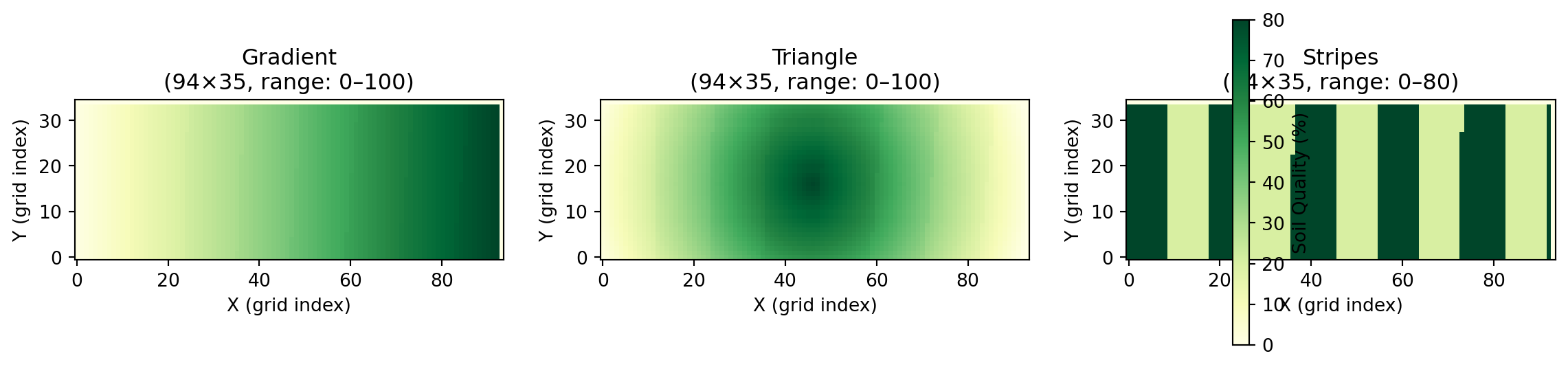
For a more comprehensive check, use load_jshd() and plot_jshd() to load the entire JSHD contents and visualize them. This is especially useful when debugging preprocessing issues or verifying spatial patterns.
Figure 2: Visual verification of preprocessed JSHD files showing all three spatial patterns
The visualization confirms that preprocessing preserved the spatial patterns:
Gradient: Values increase from left (low) to right (high)
Triangle: Values peak in the center and decrease toward edges
Stripes: Alternating bands of low (20%) and high (80%) values
Single File Inspection
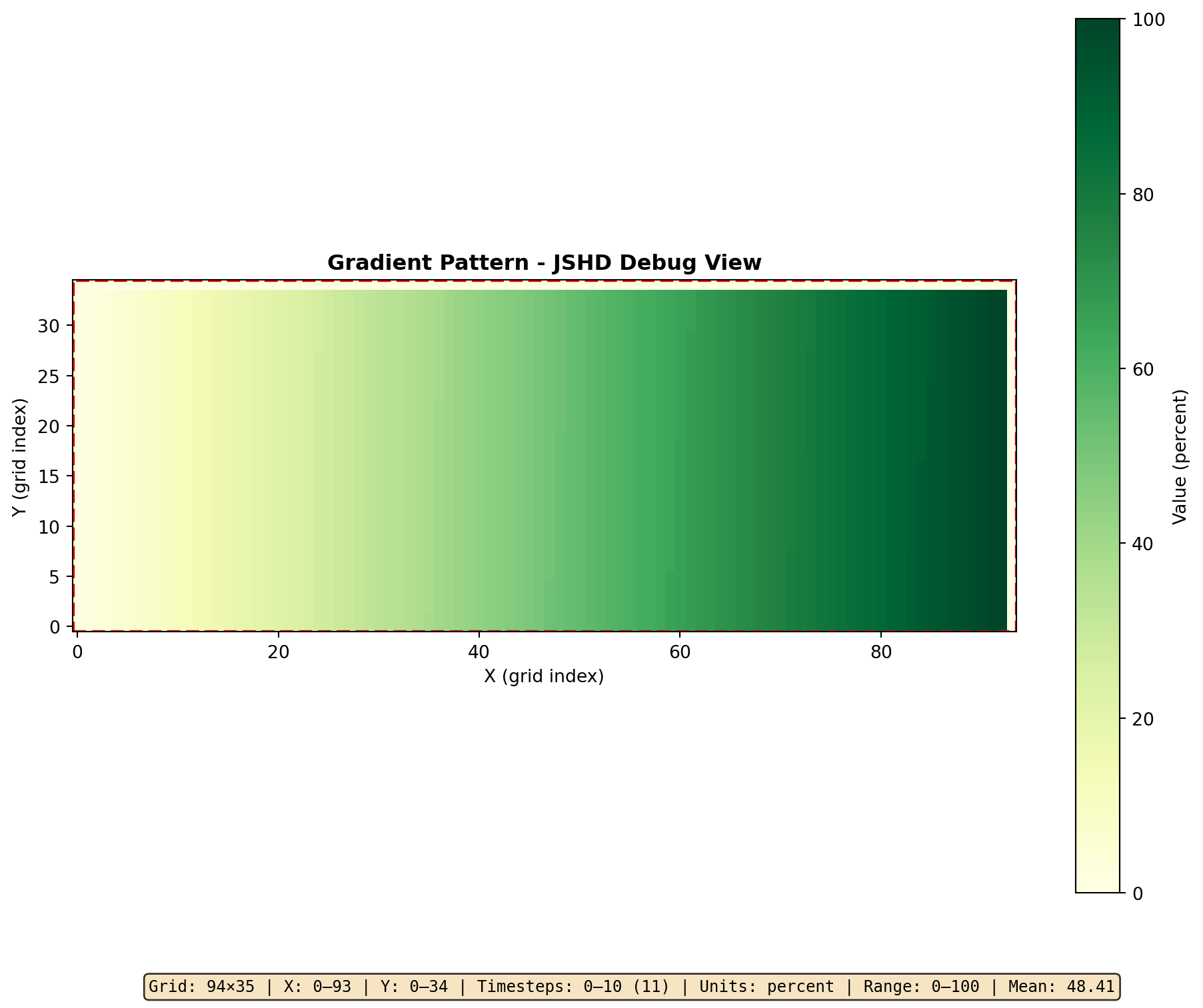
For detailed inspection of a single file, use plot_jshd() directly:
data = load_jshd(cli, DATA_DIR /"soil_quality_gradient.jshd")# Print metadataprint(f"Grid: {data.metadata.width} × {data.metadata.height}")print(f"Timesteps: {data.metadata.num_timesteps}")print(f"Units: {data.metadata.units}")# Create debug plot with full metadatafig = plot_jshd(data, timestep=0, cmap="YlGn", title="Gradient Pattern - JSHD Debug View")
Grid: 94 × 35
Timesteps: 11
Units: percent
Figure 3: Detailed JSHD inspection with metadata
Step 5: Preprocessing GeoTIFF/COG Files
GeoTIFF and Cloud-Optimized GeoTIFF (COG) files are common for satellite imagery, elevation models, and land cover data. Use GeotiffPreprocessConfig for these files.
ImportantRequired: timestep Parameter
GeoTIFF files have no time dimension, so you must specify timestep to indicate which simulation step the data maps to. For initial conditions, use timestep=0.
Create Synthetic GeoTIFF
# This example requires rasterio - shown for referenceimport numpy as npimport rasteriofrom rasterio.transform import from_boundsDATA_DIR = Path("../../examples/external_data")# Grid specification (same as NetCDF examples)LAT_MIN, LAT_MAX =33.7, 34.0LON_MIN, LON_MAX =-116.4, -115.4# Create elevation data - simple gradient from west to eastwidth, height =102, 31elevation = np.tile(np.linspace(100, 500, width), (height, 1)).astype(np.float32)# Write GeoTIFFtransform = from_bounds(LON_MIN, LAT_MIN, LON_MAX, LAT_MAX, width, height)with rasterio.open( DATA_DIR /"elevation.tif",'w', driver='GTiff', height=height, width=width, count=1, dtype=elevation.dtype, crs='EPSG:4326', transform=transform,) as dst: dst.write(elevation, 1)print(f"Created elevation.tif ({width}x{height})")
Preprocess GeoTIFF
from joshpy.cli import JoshCLI, GeotiffPreprocessConfigfrom joshpy.jar import JarModefrom pathlib import Pathcli = JoshCLI(josh_jar=JarMode.DEV)SOURCE_PATH = Path("../../examples/external_sweep.josh")DATA_DIR = Path("../../examples/external_data")result = cli.preprocess(GeotiffPreprocessConfig( script=SOURCE_PATH, simulation="Main", data_file=DATA_DIR /"elevation.tif", band=0, # Band index (0-based) units="meters", output=DATA_DIR /"elevation.jshd", timestep=0, # Required: maps to simulation step 0 crs="EPSG:4326", # Specify if not embedded in TIF))if result.success:print("GeoTIFF preprocessed successfully!")else:print(f"Error: {result.stderr}")
GeotiffPreprocessConfig Options
Parameter
Description
script
Josh simulation file (defines target grid)
simulation
Name of simulation to use
data_file
Input GeoTIFF file (.tif, .tiff)
band
Band index to extract (0-based)
units
Units for the data
output
Output .jshd file path
timestep
Required: Simulation timestep this data maps to
amend
Add to existing .jshd file (default: False)
crs
Coordinate reference system (if not embedded in file)
parallel
Enable parallel processing (~Nx speedup on N cores)
NoteGeoTIFF Coordinates
GeoTIFF spatial coordinates are embedded in the file format itself, so x_coord and y_coord options are not needed (and will be ignored if provided).
Step 6: Preprocessing CSV Point Data
CSV files are useful for point observations like weather station data or field measurements. Use CsvPreprocessConfig for CSV files.
WarningCSV Format Requirements
CSV files must have columns named exactly longitude and latitude. All other columns are available as variables to extract.
Create Synthetic CSV
import pandas as pdimport numpy as npfrom pathlib import PathDATA_DIR = Path("../../examples/external_data")DATA_DIR.mkdir(parents=True, exist_ok=True)# Create weather station datanp.random.seed(42)n_stations =50# Random station locations within the gridlons = np.random.uniform(-116.4, -115.4, n_stations)lats = np.random.uniform(33.7, 34.0, n_stations)# Temperature increases with latitude (north is warmer in this example)temperature =20+ (lats -33.7) *30+ np.random.normal(0, 2, n_stations)# Precipitation decreases west to eastprecipitation =500- (lons +116.4) *400+ np.random.normal(0, 20, n_stations)precipitation = np.clip(precipitation, 50, 800)df = pd.DataFrame({'longitude': lons,'latitude': lats,'temperature': temperature.round(1),'precipitation': precipitation.round(0),})csv_path = DATA_DIR /"weather_stations.csv"df.to_csv(csv_path, index=False)print(f"Created {csv_path.name} with {len(df)} stations")print(df.head())
Created weather_stations.csv with 50 stations
    longitude   latitude  temperature  precipitation
0 -116.025460  33.990875         28.9          330.0
1 -115.449286  33.932540         26.4          108.0
2 -115.668006  33.981850         28.6          209.0
3 -115.801342  33.968448         24.1          250.0
4 -116.243981  33.879370         24.9          407.0
Temperature CSV preprocessed successfully!
Precipitation CSV preprocessed successfully!
CsvPreprocessConfig Options
Parameter
Description
script
Josh simulation file (defines target grid)
simulation
Name of simulation to use
data_file
Input CSV file (.csv)
variable
Column name to extract
units
Units for the data
output
Output .jshd file path
timestep
Required: Simulation timestep this data maps to
amend
Add to existing .jshd file (default: False)
crs
Coordinate reference system
parallel
Enable parallel processing (~Nx speedup on N cores)
WarningCSV Performance Note
CSV preprocessing uses nearest-neighbor interpolation with a brute-force O(n) scan per grid cell. This may be slow for large CSV files (thousands of points) or large simulation grids. For better performance with large datasets, consider:
Converting CSV to GeoTIFF using tools like GDAL
Using NetCDF format which supports spatial indexing
Verify CSV Preprocessing
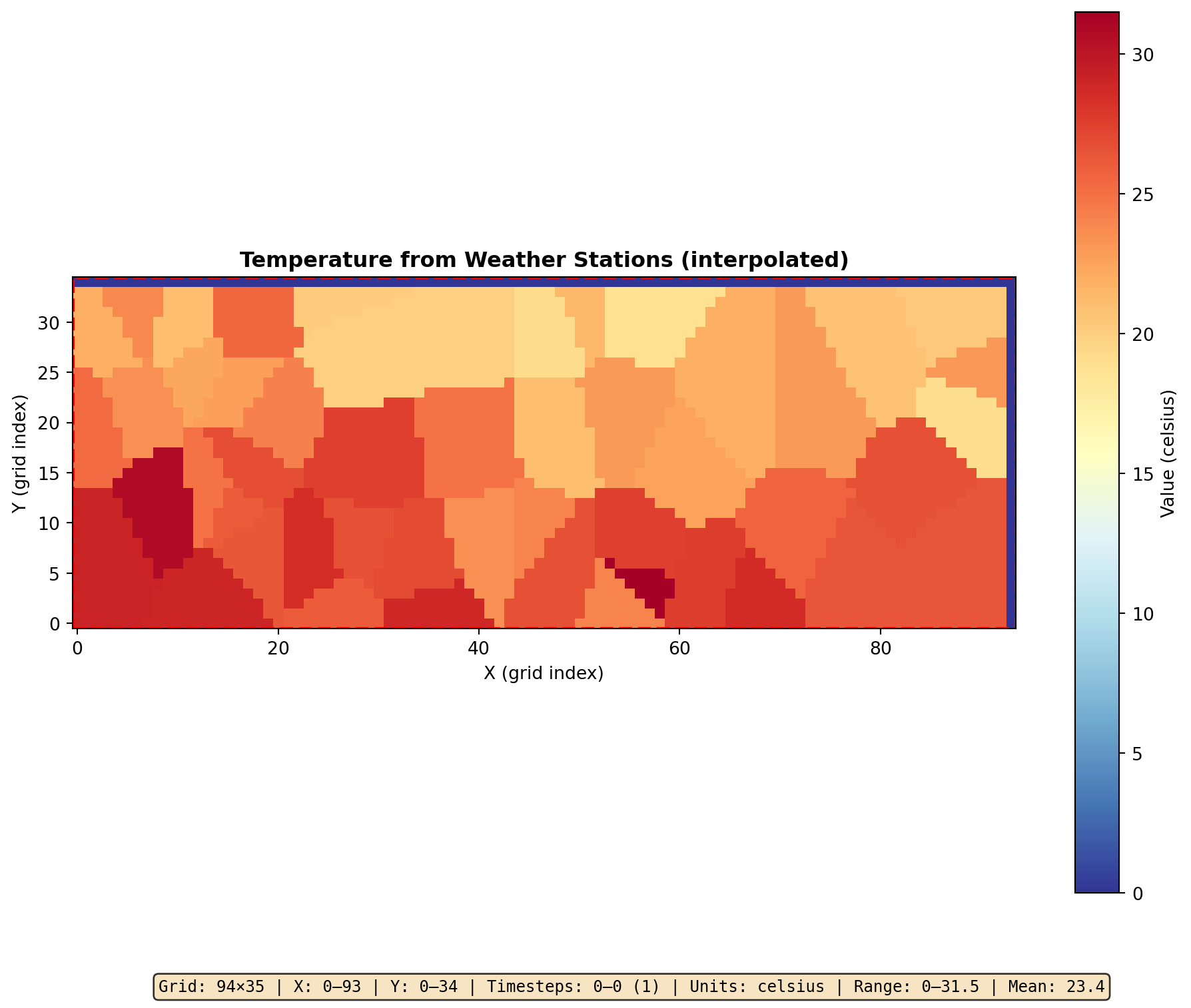
from joshpy import load_jshd, plot_jshd# Load and visualizedata = load_jshd(cli, DATA_DIR /"station_temperature.jshd")print(f"Grid: {data.metadata.width} × {data.metadata.height}")print(f"Units: {data.metadata.units}")arr = data.to_array(timestep=0)print(f"Value range: {arr.min():.1f} to {arr.max():.1f}")fig = plot_jshd(data, timestep=0, cmap="RdYlBu_r", title="Temperature from Weather Stations (interpolated)")
Grid: 94 × 35
Units: celsius
Value range: 0.0 to 31.5
CSV point data interpolated to simulation grid
Step 7: GridSpec-Based Preprocessing
Steps 2–6 showed the low-level cli.preprocess() API where you manage output paths and file inventories yourself. GridSpec provides a higher-level workflow: you preprocess through the grid, and it automatically registers each file and writes a grid.yaml manifest. This is the recommended approach for structured projects.
Static files (auto-registered)
When you call grid.preprocess_netcdf() without a variant argument, the output goes to output_dir/{josh_name}.jshd and the file is auto-registered in grid.files:
The resulting grid.yaml contains both grid geometry and the file inventory. Load it later with GridSpec.from_yaml() to get file_mappings and template_vars for JobConfig.
Variant files
When data files vary by scenario (e.g., different soil patterns or climate projections), declare variant axes in the GridSpec and preprocess each value with the variant parameter. This produces the template_path entries that power variant_sweep().
Quick one-off preprocessing, scripts, or non-grid workflows
grid.preprocess_*()
Structured projects where you want a grid.yaml manifest
Both produce identical .jshd files – the difference is whether the inventory is tracked in a YAML manifest or managed manually.
Summary
In this tutorial, we:
Created synthetic test data with clear spatial patterns using scipy.io.netcdf_file
Preprocessed NetCDF to .jshd using NetcdfPreprocessConfig
Preprocessed GeoTIFF using GeotiffPreprocessConfig (with required timestep)
Preprocessed CSV point data using CsvPreprocessConfig (with required timestep)
Verified results using cli.inspect_jshd() and plot_jshd()
Built a GridSpec manifest using grid.preprocess_netcdf() and grid.save()
The preprocessed .jshd files are now ready for use in simulations. The next tutorial, Sweeping Over External Data, demonstrates how to run parameter sweeps over multiple external data files. For the GridSpec-based variant sweep workflow, see GridSpec Variant Sweeps.
Format Comparison
Format
Config Class
timestep
Coordinates
Best For
NetCDF
NetcdfPreprocessConfig
Optional
Via x_coord, y_coord, time_coord
Climate data with time series
GeoTIFF
GeotiffPreprocessConfig
Required
Embedded in file
Raster imagery, DEMs
CSV
CsvPreprocessConfig
Required
Must be longitude, latitude columns
Point observations
Files Created
File
Description
examples/external_data/soil_quality_gradient.nc
Synthetic NetCDF - west-to-east gradient
examples/external_data/soil_quality_triangle.nc
Synthetic NetCDF - center peak
examples/external_data/soil_quality_stripes.nc
Synthetic NetCDF - alternating stripes
examples/external_data/soil_quality_gradient.jshd
Preprocessed - gradient pattern
examples/external_data/soil_quality_triangle.jshd
Preprocessed - triangle pattern
examples/external_data/soil_quality_stripes.jshd
Preprocessed - stripes pattern
examples/external_data/weather_stations.csv
Synthetic CSV - station observations
examples/external_data/station_temperature.jshd
Preprocessed - temperature from stations
examples/external_data/station_precipitation.jshd
Preprocessed - precipitation from stations
TipGrid Alignment & JSHD Reuse
JSHD files are tied to specific grid definitions. If you change grid.size, grid.low, or grid.high in your simulation, you must regenerate the JSHD files. See Best Practices: Preprocessing & Grid Alignment for compatibility rules and directory organization patterns.