from pathlib import Path

from joshpy.jobs import JobConfig, SweepConfig, ConfigSweepParameter
from joshpy.strategies import CartesianStrategy

# Paths to source files (optimized for fast tutorial builds)
SOURCE_PATH = Path("../../examples/tutorial_sweep.josh")
TEMPLATE_PATH = Path("../../examples/templates/sweep_config.jshc.j2")

# Parameter sweep: maxGrowth from 10 to 100 in steps of 10
MAX_GROWTH_VALUES = list(range(10, 101, 10))

config = JobConfig(
    template_path=TEMPLATE_PATH,
    source_path=SOURCE_PATH,
    simulation="Main",
    replicates=3,
    sweep=SweepConfig(
        config_parameters=[
            # maxGrowth is swept - creates one job per value
            ConfigSweepParameter(name="maxGrowth", values=MAX_GROWTH_VALUES),
        ],
        # CartesianStrategy runs all parameter combinations (the default).
        # For adaptive optimization, see OptunaStrategy in the Adaptive Sweep tutorial.
        strategy=CartesianStrategy(),
    ),
)SweepManager Workflow
Simplified parameter sweep using SweepManager
Introduction
Josh is an ecological simulation runtime for agent-based modeling developed by the Eric and Wendy Schmidt Center for Data Science and Environment. This demo assumes familiarity with Josh’s simulation language and runtime.
joshpy is a Python client that enables:
- Orchestration: Define parameter sweeps, expand job configurations, and execute simulations programmatically
- Tracking: Register runs in a DuckDB-backed registry with session and config tracking
- Data Loading: Import cell-level CSV exports into queryable tables
- Analysis: Query results across parameter values and replicates
- Diagnostics: Quick matplotlib visualizations for simulation sanity checks
- Visualization: Create publication-quality plots with R/ggplot2 integration
This demo walks through a complete parameter sweep workflow using SweepManager, which encapsulates the common workflow of expanding, running, and collecting sweep results. For a more detailed walkthrough using each component directly, see Manual Workflow.
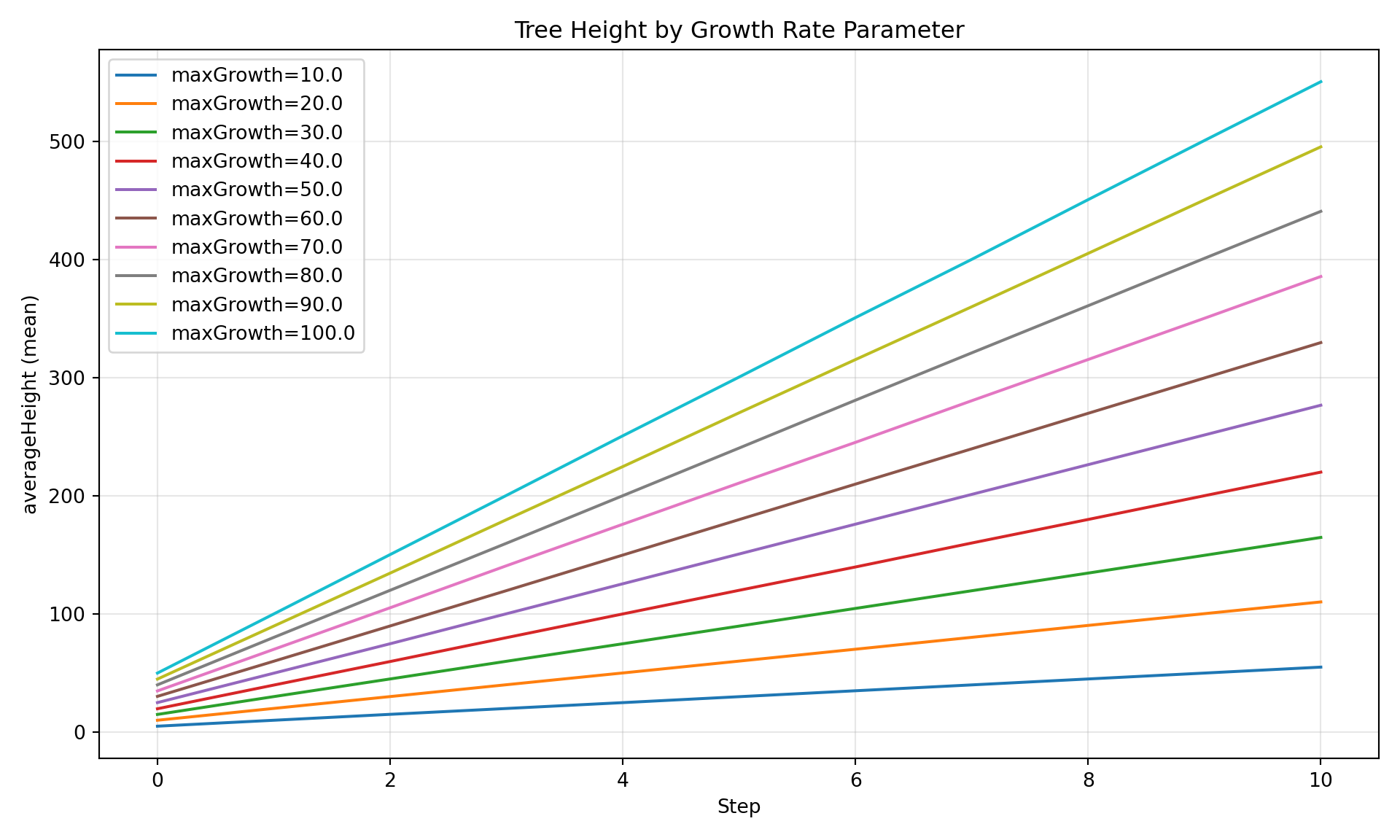
We vary the maxGrowth parameter from 10 to 100 meters/step across 10 experiments, each with 3 replicates, then load, query, and visualize the results.
Prerequisites
Ensure joshpy is installed (the Josh JAR is auto-downloaded on first use):
pip install -e '.[all]'For visualization, ensure R is installed with the following packages:
install.packages(c("reticulate", "ggplot2", "dplyr"))Step 1: Define Parameter Sweep
The first step is to define our experiment configuration. joshpy uses three key abstractions:
JobConfig: The top-level configuration specifying source files, templates, and sweep parametersSweepConfig: Defines which parameters to sweep and their valuesConfigSweepParameter: A single configuration parameter with a name and list of values
The sweep creates one job per maxGrowth value (10, 20, …, 100). Static values like daysPerYear are defined directly in the template, not as sweep parameters.
Let’s examine the source files. The .josh file defines the simulation, and the .jshc.j2 template provides parameterized configuration:
Josh Source
print(SOURCE_PATH.read_text())# Tutorial sweep simulation - optimized for fast documentation builds
# Uses larger grid cells (5000m) for faster execution with same extent
start simulation Main
grid.size = 5000 m
grid.low = 33.7 degrees latitude, -115.4 degrees longitude
grid.high = 34.0 degrees latitude, -116.4 degrees longitude
grid.patch = "Default"
steps.low = 0 count
steps.high = 10 count
exportFiles.patch = "file:///tmp/tutorial_sweep_{maxGrowth}_{replicate}.csv"
end simulation
start patch Default
ForeverTree.init = create 10 count of ForeverTree
export.averageAge.step = mean(ForeverTree.age)
export.averageHeight.step = mean(ForeverTree.height)
end patch
start organism ForeverTree
# Static config value - same for all sweep runs (initial tree count)
initialTreeCount.init = config sweep_config.initialTreeCount
# Swept config value - varies across sweep runs
maxGrowth.init = config sweep_config.maxGrowth
age.init = 0 year
age.step = prior.age + 1 year
height.init = 0 meters
# maxGrowth is swept via sweep_config.jshc
height.step = prior.height + sample uniform from 0 meters to maxGrowth
end organism
start unit year
alias years
alias yr
alias yrs
end unitTemplate Configuration
print(TEMPLATE_PATH.read_text())# Auto-generated configuration for tutorial_sweep.josh
# Parameter sweep: maxGrowth={{ maxGrowth }}
# =============================================================================
# STATIC CONFIG VALUES
# These values are the same for all runs in the sweep.
# Use static values for constants that don't need to vary across experiments.
# =============================================================================
# Initial tree count per organism (constant across all sweep runs)
initialTreeCount = 10 count
# =============================================================================
# SWEPT CONFIG VALUES
# These values vary across sweep runs. Each unique combination creates a job.
# Use swept values for parameters you want to explore or optimize.
# =============================================================================
# Maximum growth per timestep (meters) - SWEPT via Jinja template
maxGrowth = {{ maxGrowth }} metersNotice how the configuration template has two types of values:
- Static values (e.g.,
daysPerYear = 365 count): Fixed values that don’t use Jinja templating. These are the same for all runs in the sweep. - Swept values (e.g.,
maxGrowth = {{ maxGrowth }} meters): Values that use Jinja variables. These vary across sweep runs based on theSweepParameterdefinitions.
The .josh file references both via config sweep_config.variableName. At runtime, each config variable pulls its value from the generated .jshc file.
Step 2: Create SweepManager
The SweepManager encapsulates the entire sweep workflow. It uses a builder pattern for flexible configuration:
with_registry(): Configure DuckDB registry (path or existing instance)with_cli(): Configure JoshCLI (JAR path or existing instance)build(): Expand jobs, create session, and register configurations
from joshpy.sweep import SweepManager

from joshpy.cli import JoshCLI
from joshpy.jar import JarMode

# Registry path - saved to disk for use in analysis tutorial
REGISTRY_PATH = "demo_registry.duckdb"

# Create manager with builder pattern
manager = (
    SweepManager.builder(config)
    .with_registry(REGISTRY_PATH, experiment_name="growth_rate_sweep")
    .with_cli(JoshCLI(josh_jar=JarMode.DEV))
    .build()
)
Step 3: Run Simulations
The run() method executes all jobs with automatic registry tracking:
# Run all jobs
results = manager.run()
Running 10 jobs (30 total replicates)
[1/10] Running (local): {'maxGrowth': 10}
[OK] Completed successfully
[2/10] Running (local): {'maxGrowth': 20}
[OK] Completed successfully
[3/10] Running (local): {'maxGrowth': 30}
[OK] Completed successfully
[4/10] Running (local): {'maxGrowth': 40}
[OK] Completed successfully
[5/10] Running (local): {'maxGrowth': 50}
[OK] Completed successfully
[6/10] Running (local): {'maxGrowth': 60}
[OK] Completed successfully
[7/10] Running (local): {'maxGrowth': 70}
[OK] Completed successfully
[8/10] Running (local): {'maxGrowth': 80}
[OK] Completed successfully
[9/10] Running (local): {'maxGrowth': 90}
[OK] Completed successfully
[10/10] Running (local): {'maxGrowth': 100}
[OK] Completed successfully
Completed: 10 succeeded, 0 failed
# Fail the tutorial if any jobs failed - include actual error details
if results.failed > 0:
    errors = []
    for job, result in results:
        if not result.success:
            error_msg = result.stderr.strip() if result.stderr else "No error message"
            errors.append(f"Job {job.run_hash}: {error_msg[:500]}")
    error_detail = "\n".join(errors)
    raise RuntimeError(f"Sweep failed: {results.failed} job(s) failed\n\n{error_detail}")
TipDebugging Failures
If jobs fail, check result.stderr for Josh error messages. Common issues include unit mismatches, missing config files, and undefined identifiers. See Best Practices: Error Diagnosis for a guide to interpreting error messages.
Step 4: Load Results
The load_results() method automatically discovers export paths from the Josh file, resolves template variables for each job, and loads CSV results:
manager.load_results()Loading patch results from: /tmp/tutorial_sweep_{maxGrowth}_{replicate}.csv
Loaded 1463 rows from tutorial_sweep_10_0.csv
Loaded 1463 rows from tutorial_sweep_10_1.csv
Loaded 1463 rows from tutorial_sweep_10_2.csv
Loaded 1463 rows from tutorial_sweep_20_0.csv
Loaded 1463 rows from tutorial_sweep_20_1.csv
Loaded 1463 rows from tutorial_sweep_20_2.csv
Loaded 1463 rows from tutorial_sweep_30_0.csv
Loaded 1463 rows from tutorial_sweep_30_1.csv
Loaded 1463 rows from tutorial_sweep_30_2.csv
Loaded 1463 rows from tutorial_sweep_40_0.csv
Loaded 1463 rows from tutorial_sweep_40_1.csv
Loaded 1463 rows from tutorial_sweep_40_2.csv
Loaded 1463 rows from tutorial_sweep_50_0.csv
Loaded 1463 rows from tutorial_sweep_50_1.csv
Loaded 1463 rows from tutorial_sweep_50_2.csv
Loaded 1463 rows from tutorial_sweep_60_0.csv
Loaded 1463 rows from tutorial_sweep_60_1.csv
Loaded 1463 rows from tutorial_sweep_60_2.csv
Loaded 1463 rows from tutorial_sweep_70_0.csv
Loaded 1463 rows from tutorial_sweep_70_1.csv
Loaded 1463 rows from tutorial_sweep_70_2.csv
Loaded 1463 rows from tutorial_sweep_80_0.csv
Loaded 1463 rows from tutorial_sweep_80_1.csv
Loaded 1463 rows from tutorial_sweep_80_2.csv
Loaded 1463 rows from tutorial_sweep_90_0.csv
Loaded 1463 rows from tutorial_sweep_90_1.csv
Loaded 1463 rows from tutorial_sweep_90_2.csv
Loaded 1463 rows from tutorial_sweep_100_0.csv
Loaded 1463 rows from tutorial_sweep_100_1.csv
Loaded 1463 rows from tutorial_sweep_100_2.csv
Results:
Jobs in sweep: 10
Jobs with results loaded: 10
Total rows loaded: 43890
43890Step 5: Verify Data Loaded
Let’s verify the data is in the registry and ready for analysis:
# Get summary of loaded data
summary = manager.registry.get_data_summary()
print(summary)
Registry Data Summary
========================================
Sessions: 1
Configs: 10
Runs: 10
Rows: 43,890
Variables: averageAge, averageHeight
Entity types: patch
Parameters: maxGrowth
Steps: 0 - 10
Replicates: 0 - 2
Spatial extent: lon [-115.37, -114.40], lat [33.41, 33.68]manager.registry.list_export_variables()['averageAge', 'averageHeight']manager.registry.list_config_parameters()['maxGrowth']Next Steps: Analysis
Now that data is loaded, see Analysis & Visualization Tutorial for comprehensive coverage of:
- Diagnostic Plots (
SimulationDiagnostics) - quick matplotlib visualizations - Custom Queries (
DiagnosticQueries) - get pandas DataFrames - Direct SQL - full DuckDB access for advanced analysis
- R/ggplot2 - publication-quality figures
Quick example using manager.query():
# Query with parameter grouping
df = manager.query("averageHeight", group_by="maxGrowth")
df.head(10)| param_value | step | mean_value | std_value | n_cells | |
|---|---|---|---|---|---|
| 0 | 10.0 | 0 | 4.990825 | 0.914275 | 399 |
| 1 | 10.0 | 1 | 10.054546 | 1.244391 | 399 |
| 2 | 10.0 | 2 | 15.012953 | 1.548240 | 399 |
| 3 | 10.0 | 3 | 20.005701 | 1.847471 | 399 |
| 4 | 10.0 | 4 | 25.058594 | 2.014672 | 399 |
| 5 | 10.0 | 5 | 30.031544 | 2.194709 | 399 |
| 6 | 10.0 | 6 | 35.077375 | 2.397354 | 399 |
| 7 | 10.0 | 7 | 40.056394 | 2.636158 | 399 |
| 8 | 10.0 | 8 | 45.132441 | 2.798784 | 399 |
| 9 | 10.0 | 9 | 50.117931 | 2.962958 | 399 |
from joshpy.diagnostics import SimulationDiagnostics

diag = SimulationDiagnostics(manager.registry)
diag.plot_comparison(
    "averageHeight",
    group_by="maxGrowth",
    title="Tree Height by Growth Rate Parameter",
)
Single Runs, Templating & Project Layout
SweepManager also supports single runs (no sweep) using raw .jshc files, and .josh.j2 model templating to avoid duplicating model files across grid configurations. See the Project Organization tutorial for the full guide, including:
config_pathfor raw.jshcfiles (no Jinja rendering)source_template_pathfor.josh.j2model templatesdiscover_jshd_files()for auto-building file mappings- Recommended directory layout for multi-grid projects
Summary
This demo illustrated the SweepManager workflow:
- Define a parameter sweep using
JobConfigandSweepConfig - Build a
SweepManagerwith builder pattern (handles expansion and registration) - Execute with
manager.run()- single method replaces manual loops - Load outputs with
manager.load_results()- automatic path discovery - Analyze - see Analysis Tutorial for visualization and queries
SweepManager Benefits:
- Encapsulation: One object manages registry, CLI, and job set
- Context manager: Automatic cleanup with
withstatement - Builder pattern: Flexible configuration with sensible defaults
- Convenience methods:
run(),load_results(),query()for common operations
Alternative Creation Methods:
# From dictionary
manager = SweepManager.from_dict(config.to_dict(), registry=":memory:")

# From YAML file
manager = SweepManager.from_yaml(Path("experiment.yaml"))

# With existing components
manager = (
    SweepManager.builder(config)
    .with_registry(existing_registry, session_id="existing-session")
    .with_cli(existing_cli)
    .build()
)
Related Tutorials:
- Manual Workflow - Step-by-step control using individual components
- Sweeping Over External Data Files - FileSweepParameter for data file sweeps
- Analysis & Visualization - Analysis and visualization (decoupled from orchestration)
Cleanup
# SweepManager cleanup (also works as context manager)
manager.cleanup()  # Remove temporary config files
manager.close()    # Close registry connection
The registry has been saved to demo_registry.duckdb. Run the Analysis Tutorial to explore the results.
Alternative: Context Manager
# Automatic cleanup with context manager
with SweepManager.from_dict(config.to_dict()) as manager:
    manager.run()
    manager.load_results()
    df = manager.query("averageHeight", group_by="maxGrowth")
# Resources automatically cleaned up here