Run a simulation, tweak parameters, compare results: the daily research workflow
Overview
This tutorial walks through the most common joshpy workflow:
Run a simulation with a config file
Inspect the results
Tweak a parameter and run again
Compare the two runs side by side
This is the “tinkering” workflow researchers use day-to-day before committing to a systematic parameter sweep.
Prerequisites
pip install -e'.[all]'
The Example Model
We use the tutorial tree growth model, which tracks tree height and age over time. The model reads two config parameters:
initialTreeCount – how many trees per patch at initialization
maxGrowth – maximum height growth per timestep (meters)
from pathlib import PathSOURCE_PATH = Path("../../examples/tutorial_sweep.josh")print(SOURCE_PATH.read_text())
# Tutorial sweep simulation - optimized for fast documentation builds
# Uses larger grid cells (5000m) for faster execution with same extent

start simulation Main

  grid.size = 5000 m
  grid.low = 33.7 degrees latitude, -115.4 degrees longitude
  grid.high = 34.0 degrees latitude, -116.4 degrees longitude
  grid.patch = "Default"

  steps.low = 0 count
  steps.high = 10 count

  exportFiles.patch = "file:///tmp/tutorial_sweep_{maxGrowth}_{replicate}.csv"

end simulation

start patch Default

  ForeverTree.init = create 10 count of ForeverTree

  export.averageAge.step = mean(ForeverTree.age)
  export.averageHeight.step = mean(ForeverTree.height)

end patch

start organism ForeverTree

  # Static config value - same for all sweep runs (initial tree count)
  initialTreeCount.init = config sweep_config.initialTreeCount

  # Swept config value - varies across sweep runs
  maxGrowth.init = config sweep_config.maxGrowth

  age.init = 0 year
  age.step = prior.age + 1 year

  height.init = 0 meters
  # maxGrowth is swept via sweep_config.jshc
  height.step = prior.height + sample uniform from 0 meters to maxGrowth

end organism

start unit year

  alias years
  alias yr
  alias yrs

end unit
Step 1: First Run (Baseline)
Create a JobConfig pointing at the model and a raw .jshc config file. When you use config_path (a raw .jshc, no Jinja templating), joshpy auto-parses all parameter values and stores them in the registry for querying.
Running 1 jobs (3 total replicates)
[1/1] Running (local): {'initialTreeCount': 10, 'maxGrowth': 50}
  [OK] Completed successfully
Completed: 1 succeeded, 0 failed
Completed: 1 succeeded, 0 failed
Loading patch results from: /tmp/tutorial_sweep_{maxGrowth}_{replicate}.csv
  Loaded 1463 rows from tutorial_sweep_50_0.csv
  Loaded 1463 rows from tutorial_sweep_50_1.csv
  Loaded 1463 rows from tutorial_sweep_50_2.csv

Results:
  Jobs in sweep: 1
  Jobs with results loaded: 1
  Total rows loaded: 4389
4389
The label is registry metadata — a human-readable name stored alongside the run’s hash for querying and comparison. It is not a simulation parameter and does not affect the run itself. Setting it on JobConfig or via .with_label() also makes it available as a {label} template variable in Josh export paths.
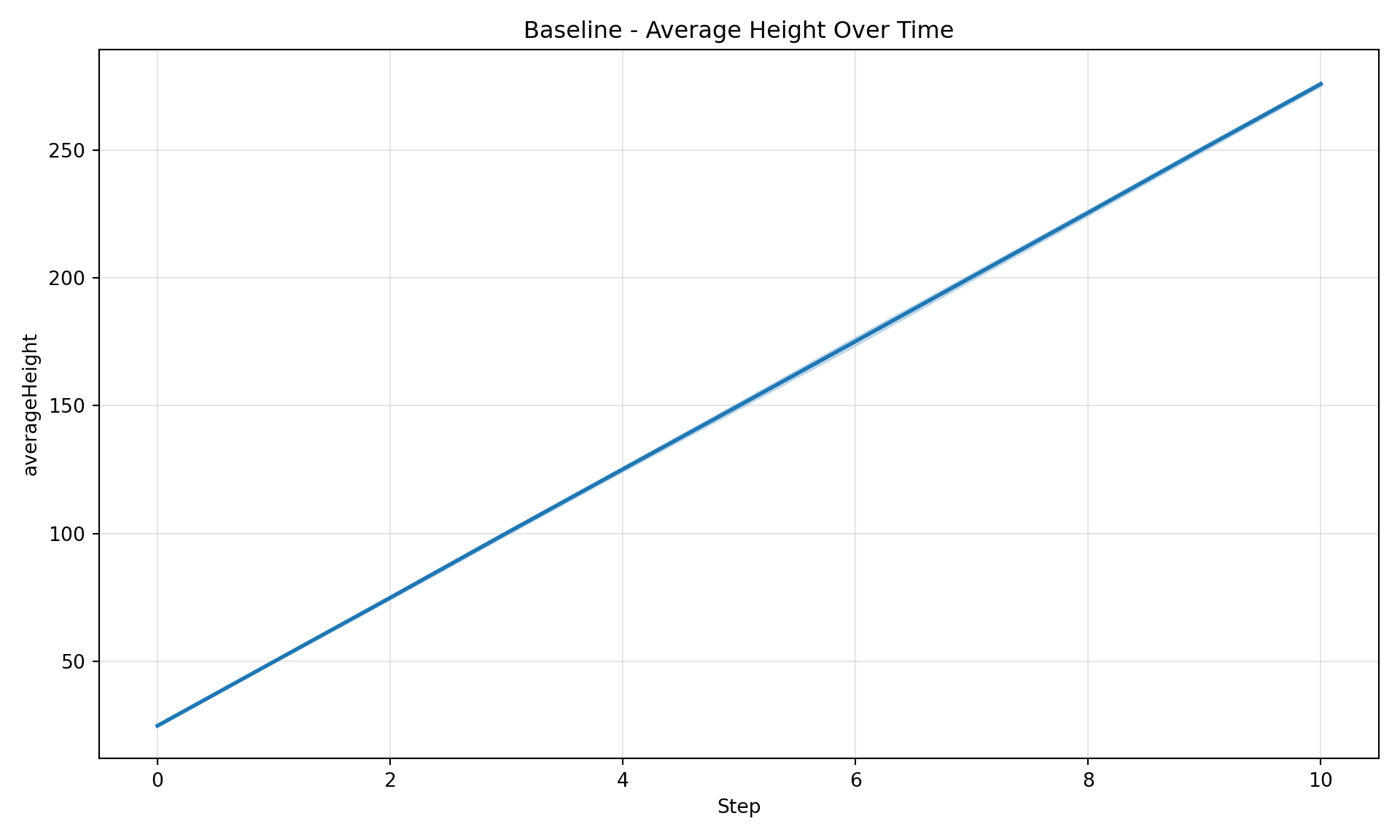
diag = SimulationDiagnostics(registry)diag.plot_timeseries("averageHeight", title="Baseline - Average Height Over Time")
registry.close()
Step 2: Tweak and Re-Run
What happens if we double maxGrowth from 50 to 100? Edit baseline.jshc (or use a second config file) and re-run with the same label. The on_collision="supersede" option retires the old run — it releases the label and is marked status="superseded" pointing at the new run — so the bare "baseline" label always points to your latest attempt:
# High growth configuration for iteration tutorial
# Same as baseline but with maxGrowth increased from 50 to 100

initialTreeCount = 10 count
maxGrowth = 100 meters
Running 1 jobs (3 total replicates)
[1/1] Running (local): {'initialTreeCount': 10, 'maxGrowth': 100}
  [OK] Completed successfully
Completed: 1 succeeded, 0 failed
Completed: 1 succeeded, 0 failed
Loading patch results from: /tmp/tutorial_sweep_{maxGrowth}_{replicate}.csv
  Loaded 1463 rows from tutorial_sweep_100_0.csv
  Loaded 1463 rows from tutorial_sweep_100_1.csv
  Loaded 1463 rows from tutorial_sweep_100_2.csv

Results:
  Jobs in sweep: 1
  Jobs with results loaded: 1
  Total rows loaded: 4389
4389
Both runs still live in the same DuckDB file, but the old baseline is now superseded: it released the "baseline" label (which points to the new run) and carries status="superseded" with a superseded_by link back to the new run. Its results stay queryable for provenance, but “current” reads skip it.
TipAlternatives to on_collision
If you prefer explicit control, you can use a separate .jshc file with its own label (e.g., .with_label("high_growth")), or call registry.label_run(run_hash, "name") after the fact. Use force=True instead of on_collision="supersede" when you simply mislabeled a run and want to move the label without recording a supersession.
Step 3: Compare
See What’s There
registry = RunRegistry(REGISTRY_PATH)# Which labels exist?registry.list_labels()
[('baseline', 'a1ea83982e5a')]
# What parameters were auto-parsed from the .jshc files?registry.list_config_parameters()
['initialTreeCount', 'maxGrowth']
NoteLabels vs Parameters
Labels are registry metadata — human-readable names you assign for organizing and querying runs (e.g., group_by="label"). Parameters like maxGrowth are the actual simulation inputs extracted from the stored config. A label does not affect the simulation; it identifies the run for downstream comparison and analysis.
Trace the Supersession Lineage
list_labels() shows only the current "baseline", because the old run released its label. To see the full iteration history — current run first, then each run it superseded — walk the lineage with run_history():
for detail in registry.run_history("baseline"): status = registry.get_run_status(detail.run_hash)print(f"{detail.run_hash} status={status.effective_status} "f"maxGrowth={detail.parameters.get('maxGrowth')}")
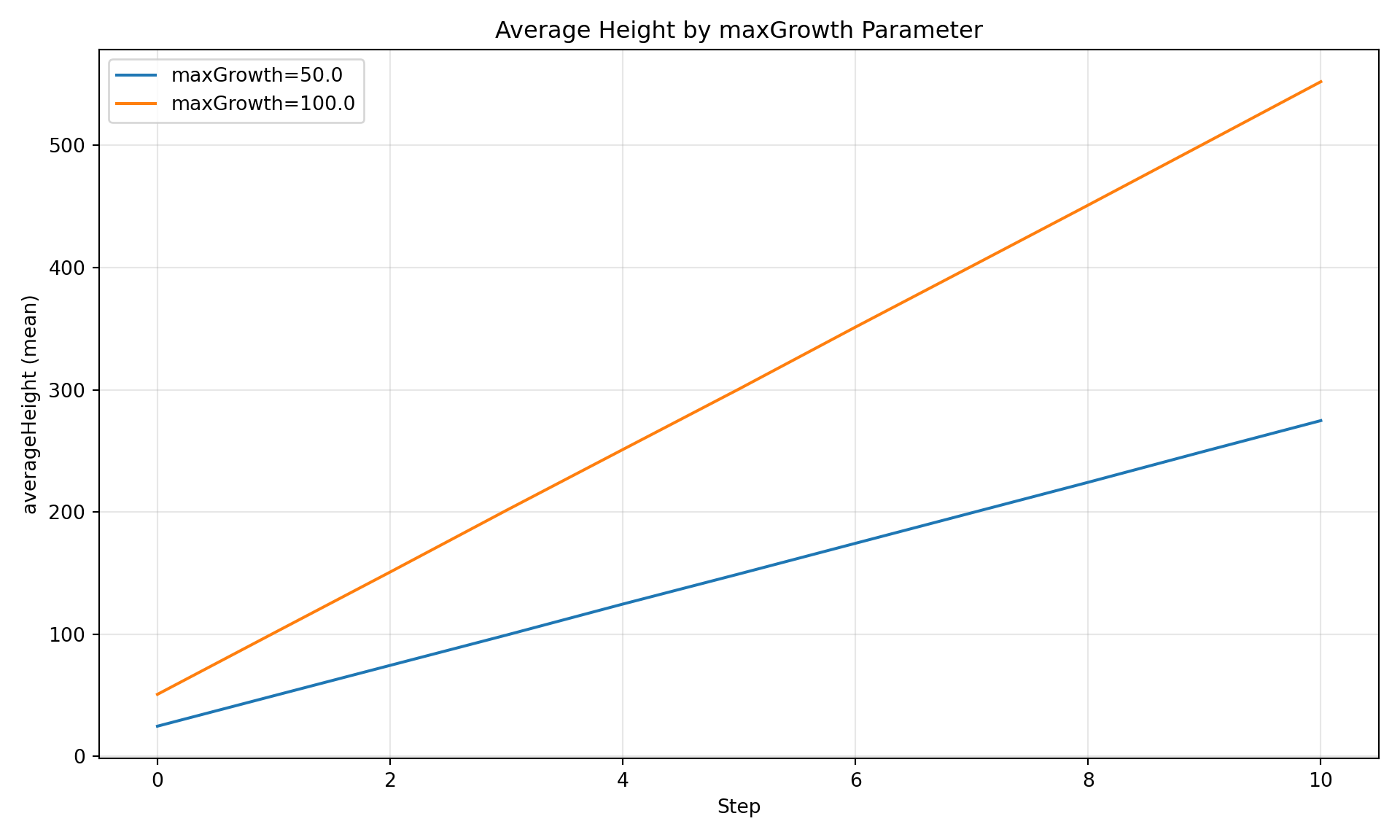
Currency retires the label, not the data: both runs’ results are still in the registry, so you can compare them by the parameter that actually changed. Since .jshc parameters were auto-parsed, group by that parameter directly:
diag = SimulationDiagnostics(registry)
diag.plot_comparison("averageHeight", group_by="maxGrowth", title="Average Height by maxGrowth Parameter",)
Figure 1: Average tree height grouped by the maxGrowth config value.
Inspect Stored Configs
The registry stores the full config content for every run, so you can always review or diff what was run – even if the original files have changed. See Inspecting Runs from the Registry for the full view/diff workflow, including the python -m joshpy.inspect CLI.
Analysis in R
The registry is a standard DuckDB file. R can connect directly and query labels:
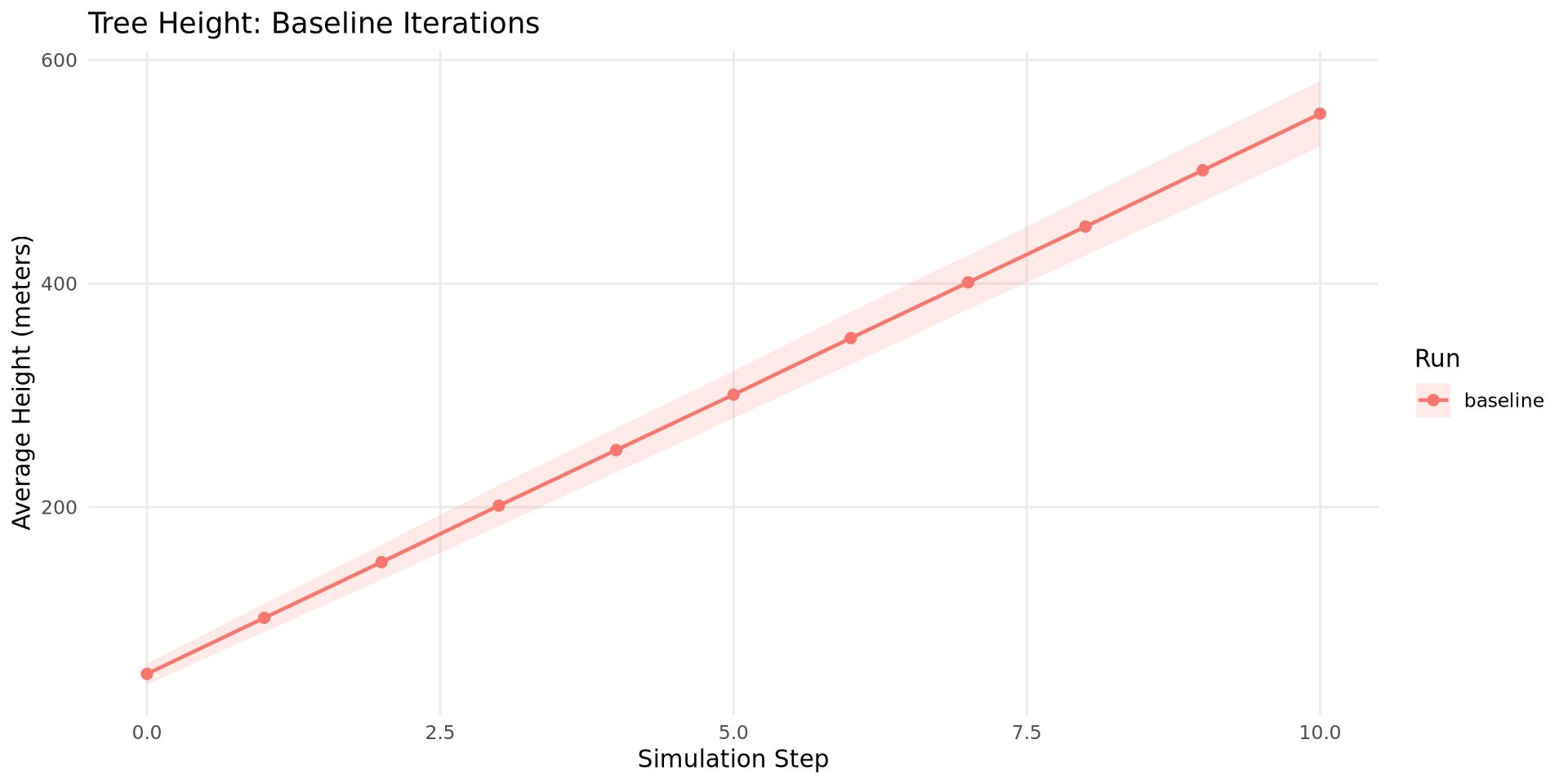
library(DBI)library(duckdb)con <-dbConnect(duckdb::duckdb(), "iteration_demo.duckdb", read_only =TRUE)df <-dbGetQuery(con, " SELECT jc.label, cd.step, AVG(cd.averageHeight) AS mean_height, STDDEV(cd.averageHeight) AS sd_height FROM cell_data cd JOIN job_configs jc ON cd.run_hash = jc.run_hash WHERE jc.label IS NOT NULL GROUP BY jc.label, cd.step ORDER BY jc.label, cd.step")ggplot(df, aes(x = step, y = mean_height, color = label, fill = label)) +geom_ribbon(aes(ymin =pmax(mean_height - sd_height, 0),ymax = mean_height + sd_height),alpha =0.15, color =NA) +geom_line(linewidth =0.8) +geom_point(size =2) +labs(x ="Simulation Step", y ="Average Height (meters)",title ="Tree Height: Baseline Iterations",color ="Run", fill ="Run") +theme_minimal() +theme(panel.grid.minor =element_blank())dbDisconnect(con, shutdown =TRUE)
Figure 2: Same comparison in R/ggplot2, querying the DuckDB registry directly.
Key Concepts
Labels
Labels are human-readable names for individual runs. Set them upfront with .with_label() on the builder. They’re unique within a registry.
Single-job configs: .with_label("name") works at build time
Multi-job sweeps: Label individual runs after the fact with registry.label_run(run_hash, "name")
Re-running with the same label (shown in Step 2): on_collision="supersede" retires the old holder — it releases the label and is marked status="superseded" pointing at the new run — so resolve_label("baseline") always returns the current run. Walk the lineage with registry.run_history("baseline") (current first, then each superseded run).
Force-reassigning a label: force=True silently drops the old label without recording supersession — for the “I mislabeled it, just fix it” case.
Run status (currency)
Every run has a lifecycle status — active (the default; also what an unmarked run reads as), superseded, or bad. “Current” is exactly status = "active". Mark runs explicitly:
registry.mark_run(run_hash, "bad", reason="...") — exclude a run you no longer trust.
registry.supersede(new_hash, replaces="baseline", reason="...") — record that new_hash replaced an existing run (releasing its label).
registry.get_run_status(label_or_hash) — inspect a run’s status, superseded_by link, and reason.
The cell_data_current view (SELECT ... FROM cell_data_current) restricts local SQL to rows from active runs only.
Auto-Parsed Config Parameters
When you use config_path (raw .jshc, no Jinja template), joshpy auto-parses all name = value unit lines and stores them as typed parameter columns. This enables group_by="maxGrowth" without defining a sweep.
Same Registry, Multiple Runs
All runs that share a registry are queryable together. Keep pointing at the same .duckdb file and results accumulate.
ProjectCatalog (for multi-session tracking)
The .with_catalog() lines in Steps 1 and 2 registered each run in a ProjectCatalog – a persistent DuckDB database that indexes your experiments across sessions. The catalog tracks which models, configs, and data were used, where results live, and whether an experiment was already run. It does NOT store simulation data – that stays in per-experiment registry files.
When you come back to a project after days or weeks, the catalog tells you what’s been done:
Before running a new experiment, check if it’s already been done:
existing = catalog.find_experiment(config)if existing:print(f"Already run: '{existing.name}' at {existing.registry_path}")else:print("Not yet run")
Already run: 'iteration_demo' at iteration_demo.duckdb
ProjectCatalog
RunRegistry
Stores
Hashes and pointers
Simulation data
Scope
One per project
One per experiment
Persistence
Across all sessions
Across sessions for one experiment
Primary use
“What have I run?”
“What were the results?”
NoteAdvanced: Cross-registry queries
If different researchers maintain separate registries (or you used separate registries for each run), catalog.open_registries() can combine them via DuckDB ATTACH:
experiments = catalog.list_experiments(status="completed")with catalog.open_registries(experiments) as conn: parts = []for i, exp inenumerate(experiments): parts.append(f"SELECT '{exp.name}' as experiment, step, "f"AVG(averageHeight) as mean_height "f"FROM exp_{i}.cell_data GROUP BY step" ) sql =" UNION ALL ".join(parts) +" ORDER BY experiment, step" df = conn.execute(sql).df()
GridSpec (for projects with external data)
GridSpec is not required for basic iteration – you can pass file_mappings as a plain dict or omit it entirely if your model has no external data. But when your project has preprocessed .jshd files across multiple scenarios, GridSpec keeps the inventory organized and scales to sweeps later.
If your model uses external data files, a GridSpec YAML file defines grid geometry and inventories the data files:
from joshpy.grid import GridSpecgrid = GridSpec.from_yaml("data/grids/dev_fine/grid.yaml")# Single run with a specific scenarioconfig = JobConfig( source_path=Path("model.josh"), config_path=Path("config.jshc"), file_mappings=grid.file_mappings_for(scenario="ssp370"),)
See Project Organization for the full GridSpec guide including variant data files and sweep generation.
import osregistry.close()catalog.close()for f in ["iteration_demo.duckdb", "iteration_demo.duckdb.wal","catalog_demo.duckdb"]:if os.path.exists(f): os.remove(f)