Use FileSweepParameter to run simulations with different input data
Introduction
joshpy’s FileSweepParameter enables sweeping over external data files, running one simulation job per input file. This is similar to sweeping over configuration parameters, but the variation comes from .jshd data files rather than .jshc configuration values.
This tutorial demonstrates:
Using the external keyword in Josh to reference preprocessed data
Configuring a file sweep with FileSweepParameter
Running with SweepManager and CartesianStrategy
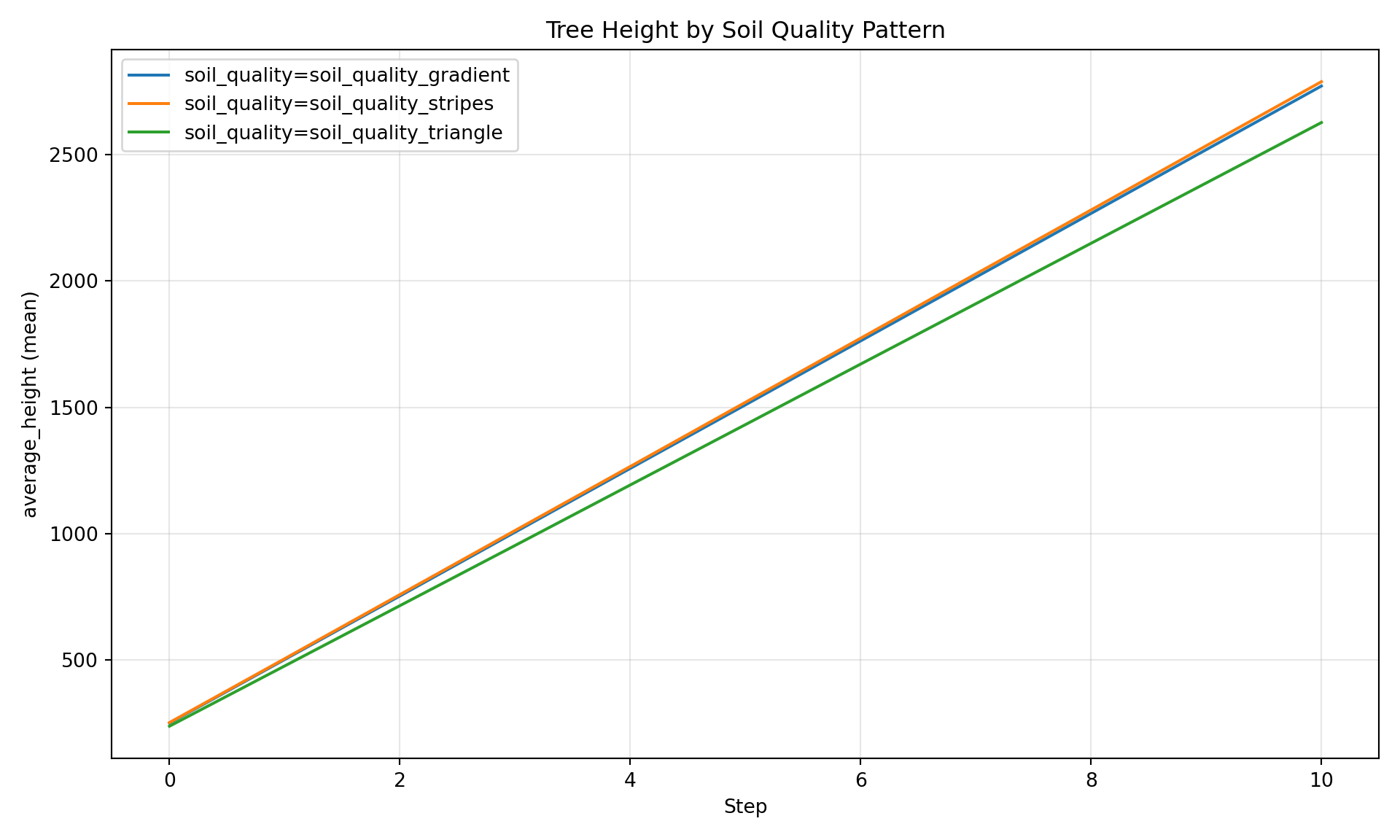
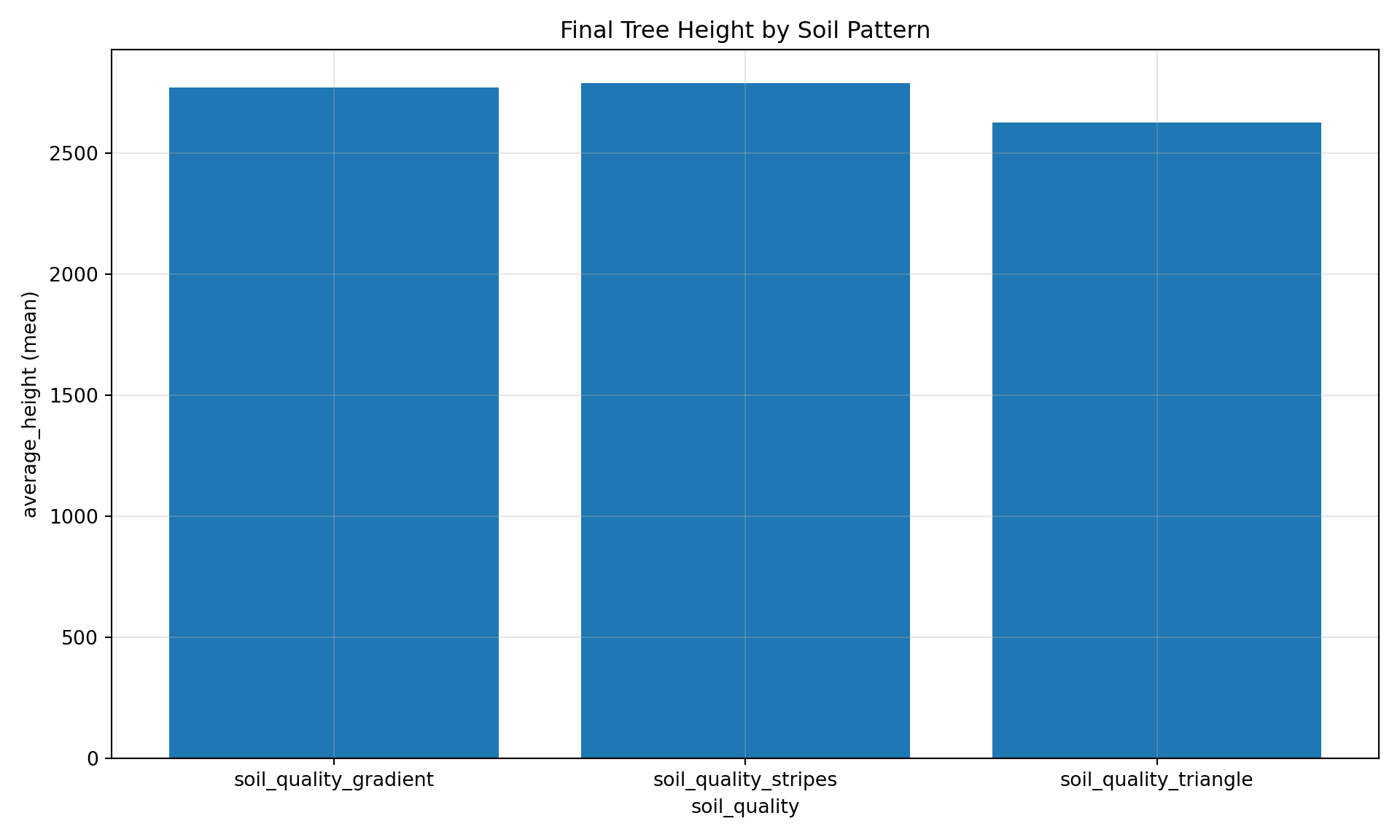
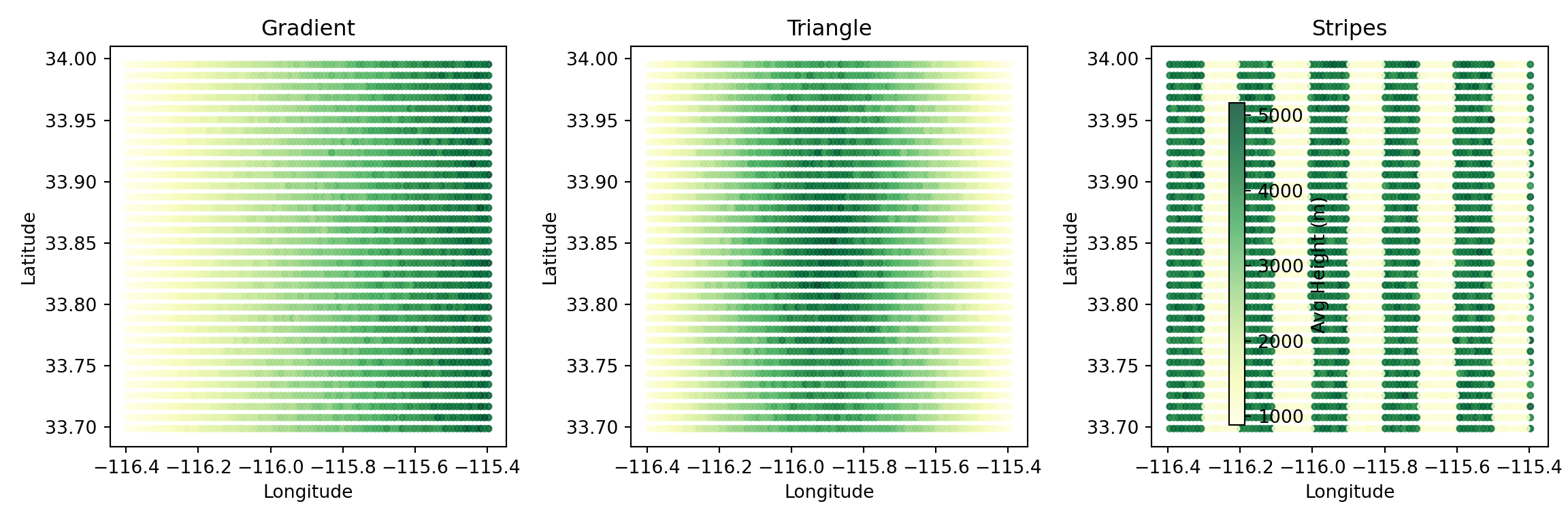
Visualizing how different input patterns produce different outputs
Our simulation uses external soil_quality to affect tree growth. Trees in patches with high soil quality grow faster than those in low-quality areas.
NoteView Simulation File (external_sweep.josh)
Code
from pathlib import PathSOURCE_PATH = Path("../../examples/external_sweep.josh")print(SOURCE_PATH.read_text())
# External data sweep simulation - tree growth affected by soil quality
# Demonstrates using external geospatial data in Josh simulations
#
# The `external soil_quality` expression reads preprocessed .jshd data
# that varies spatially across the grid. Tree growth rate scales with
# soil quality, creating visible spatial patterns in the output.

start simulation Main

  # Grid extent for the tutorial area
  # Note: grid.low = northwest corner (higher lat, lower lon)
  #       grid.high = southeast corner (lower lat, higher lon)
  grid.size = 1000 m
  grid.low = 34.0 degrees latitude, -116.4 degrees longitude
  grid.high = 33.7 degrees latitude, -115.4 degrees longitude
  grid.patch = "Default"

  # 10 timesteps to observe growth patterns
  steps.low = 0 count
  steps.high = 10 count

  # Output exports to files (run_hash passed as custom-tag by joshpy)
  exportFiles.patch = "file:///tmp/external_sweep_{run_hash}_{replicate}.csv"

end simulation

start patch Default

  # Create trees in each patch
  ForeverTree.init = create 10 count of ForeverTree

  # Read soil quality from external preprocessed data.
  # This value varies spatially based on the .jshd file content and is static
  # in time, so pin it to record 0 with the explicit `at index 0` form. A bare
  # `external soil_quality` now indexes by the current raw timestep (and warns),
  # which would walk past a single-record spatial map on later steps.
  soil_quality.step = external soil_quality at index 0

  # Export patch-level averages
  export.average_height.step = mean(ForeverTree.height)
  export.average_age.step = mean(ForeverTree.age)
  export.soil_quality.step = soil_quality

end patch

start organism ForeverTree

  age.init = 0 year
  age.step = prior.age + 1 year

  height.init = 0 meters

  # Growth rate scales with soil quality from external data
  # 0% soil quality -> 0 meters max growth
  # 100% soil quality -> 10 meters max growth
  max_growth.step = map here.soil_quality from [0 percent, 100 percent] to [0 meters, 10 meters] linear

  # Actual growth is random up to max_growth
  height.step = prior.height + sample uniform from 0 meters to max_growth

end organism

start unit year

  alias years
  alias yr
  alias yrs

end unit
Key Concepts
The external keyword:
soil_quality.step = external soil_quality at index 0
This reads the soil_quality variable from a preprocessed .jshd file. The value varies spatially across the grid based on the file content. The soil map is static in time, so we pin the read to record 0 with at index 0: a bare external soil_quality indexes by the current raw timestep (and warns), which would walk past a single-record spatial map on later steps.
Accessing patch data from organisms:
max_growth.step = map here.soil_quality from [0 percent, 100 percent] to [0 meters, 10 meters] linear
The here keyword lets organisms access variables from their containing patch. Tree growth rate scales linearly with soil quality.
Step 1: Configure the File Sweep
We use FileSweepParameter to sweep over three preprocessed .jshd files:
# Fail the tutorial if any jobs failed - include actual error detailsif results.failed >0: errors = []for job, result in results:ifnot result.success: error_msg = result.stderr.strip() if result.stderr else"No error message" errors.append(f"Job {job.run_hash}: {error_msg[:500]}") error_detail ="\n".join(errors)raiseRuntimeError(f"Sweep failed: {results.failed} job(s) failed\n\n{error_detail}")
Step 4: Load Results
manager.load_results()
Loading patch results from: /tmp/external_sweep_{run_hash}_{replicate}.csv
  Loaded 34782 rows from external_sweep_ecadfc3f59e2_0.csv
  Loaded 34782 rows from external_sweep_ecadfc3f59e2_1.csv
  Loaded 34782 rows from external_sweep_ecadfc3f59e2_2.csv
  Loaded 34782 rows from external_sweep_31438de9da4f_0.csv
  Loaded 34782 rows from external_sweep_31438de9da4f_1.csv
  Loaded 34782 rows from external_sweep_31438de9da4f_2.csv
  Loaded 34782 rows from external_sweep_0e5eac058558_0.csv
  Loaded 34782 rows from external_sweep_0e5eac058558_1.csv
  Loaded 34782 rows from external_sweep_0e5eac058558_2.csv

Results:
  Jobs in sweep: 3
  Jobs with results loaded: 3
  Total rows loaded: 313038
313038
# Verify data loadedsummary = manager.registry.get_data_summary()print(summary)
<matplotlib.colorbar.Colorbar object at 0x7f48b41e3a10>
plt.tight_layout()plt.show()
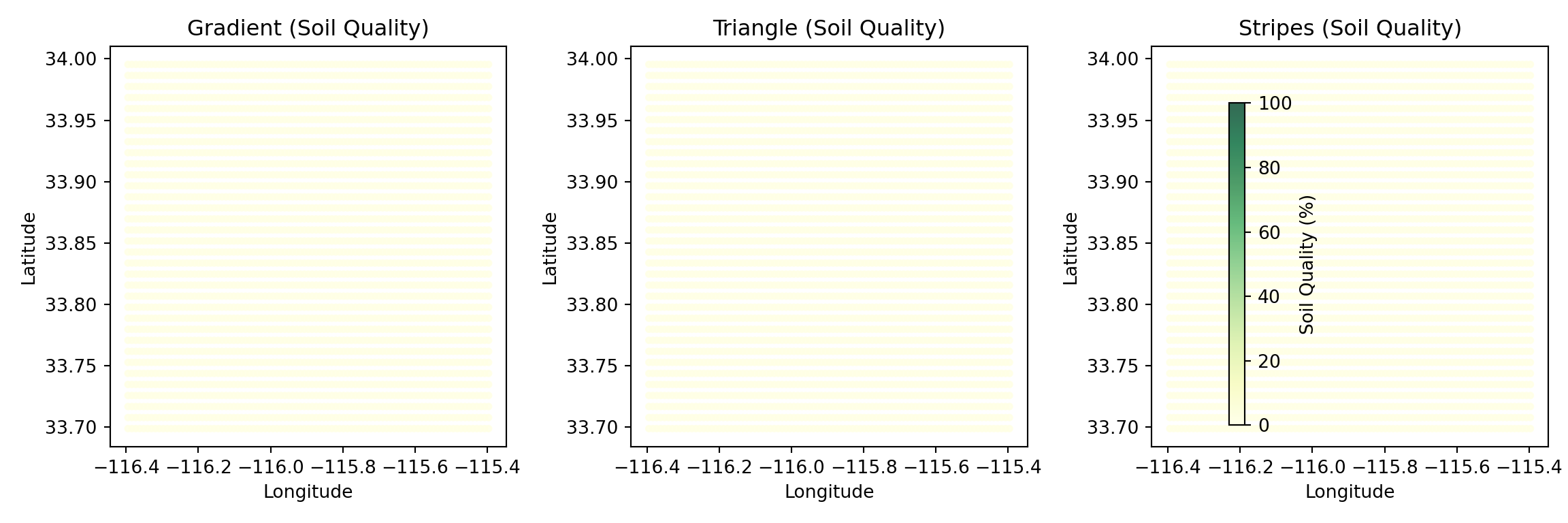
Figure 4: Exported soil quality values confirm external data was read correctly
Direct SQL Queries
For custom analysis, query the registry directly. File parameter labels are stored in config_parameters just like config params, making them easy to query:
# Compare mean height by soil pattern# File parameter labels are stored in config_parameters, just like config paramsresult = manager.registry.query(""" SELECT cp.soil_quality as pattern, cd.step, AVG(cd.average_height) as mean_height, STDDEV(cd.average_height) as std_height FROM cell_data cd JOIN config_parameters cp ON cd.run_hash = cp.run_hash GROUP BY cp.soil_quality, cd.step ORDER BY cp.soil_quality, cd.step""")result.df().head(15)
Climate scenarios: Compare RCP 2.6 vs 4.5 vs 8.5 projections
Sensitivity analysis: Test different soil maps or elevation data
Ensemble runs: Use multiple realizations of stochastic inputs
Data source comparison: Compare satellite vs ground-truth inputs
TipGridSpec Variant Sweeps
When your grid has data files that vary by scenario (e.g., 24 monthly climate files × 3 SSP scenarios), constructing FileSweepParameter objects by hand gets tedious. GridSpec variants automate this.
Declare variant axes in your grid.yaml:
variants:scenario:values:[ssp245, ssp370, ssp585]default: ssp245files:cover:path: cover.jshd # static — no templatingunits: percentfutureTempJan:template_path: monthly/tas_{scenario}_jan.jshd # resolved per scenariounits: KfuturePrecipJan:template_path: monthly/pr_{scenario}_jan.jshdunits: mm/year # ... 24 monthly files total
variant_sweep("scenario") finds every template_path file referencing {scenario}, builds one FileSweepParameter per file, and wraps them in a CompoundSweepParameter so all 24 files switch together per scenario. Static path files pass through unchanged.
import osmanager.cleanup()manager.close()# Remove temporary registry and any WAL filesfor f in [REGISTRY_PATH, f"{REGISTRY_PATH}.wal"]:if os.path.exists(f): os.remove(f)