ondio
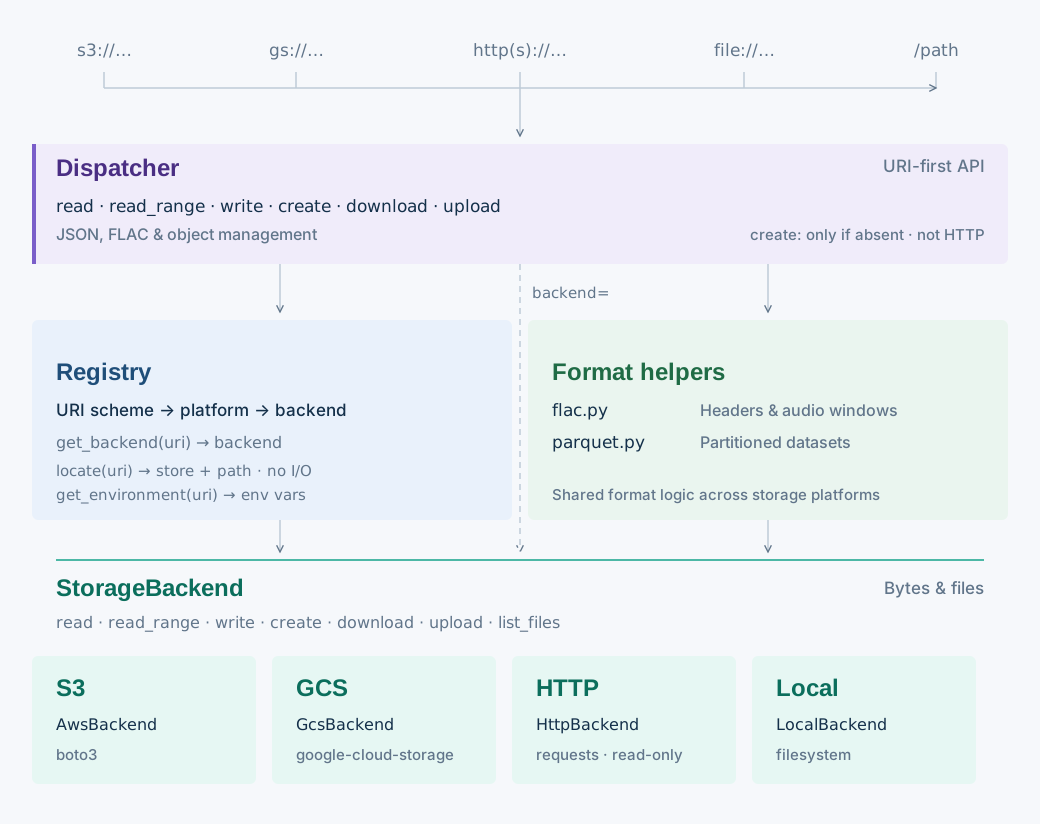
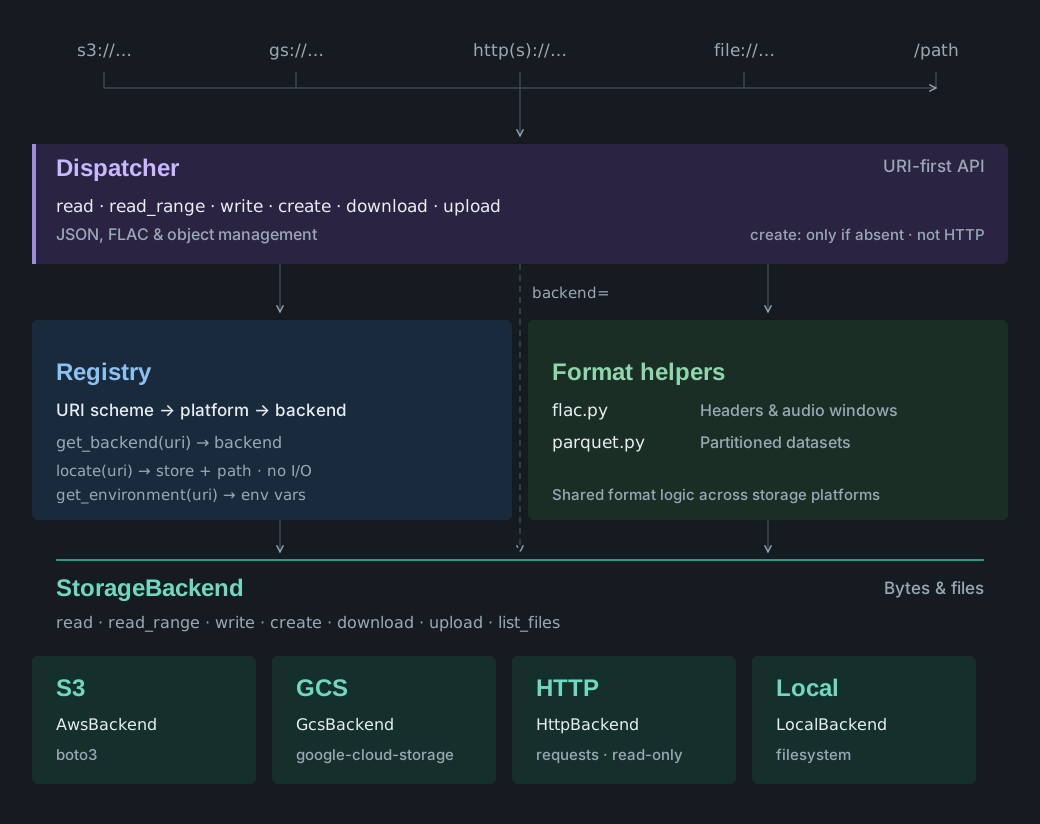
ondio — ondas (Spanish for waves) + io — is a Python package for uniform IO of
audio data (specifically just .flac at the moment) and results derived from
bioacoustic models (specifically .json and .parquet files) across a variety of
sources: AWS S3, GCS, HTTP/HTTPS, and local filesystems.
Most public functions take a URI. Its scheme selects the storage backend. Supported operations depend on the backend; HTTP is read-only.
ondio is a spin-off of soundhub_utils, with just the lightweight components to handle IO from generic backends.
Install
pip install ondio            # S3 and local disk
pip install "ondio[gcs]"     # adds gs:// (google-cloud-storage)
pip install "ondio[http]"    # adds http(s):// (requests)
pip install "ondio[parquet]" # adds write_parquet (pyarrow)
Quick start
This example uses local files and needs only the base install:
import ondio

ondio.write_json("results/summary.json", {"detections": 118})
summary = ondio.read_json("results/summary.json")
print(summary)  # {'detections': 118}
For cloud storage, see backend support and credentials. To read an audio window, see the FLAC guide. To write a dataset, see the Parquet guide.
Naming: read/write vs download/upload
The API draws one distinction consistently:
read/writemove bytes in and out of memory.read(uri)returnsbytes;write(uri, data)takes them. Nothing touches the local filesystem.download/uploadmove files on disk.download(uri, out_path)streams the object to a local path (creating parent directories);upload(uri, source_path)streams a local file to the URI without reading it into memory, replacing any existing object there. The URI always comes first, the local path second.
The format helpers follow the same rule: read_flac returns decoded samples or
FLAC bytes in memory, while download_flac writes a local .flac file;
write_json serializes a Python object straight to a URI, and read_json
fetches and parses one.
The API at a glance
| Function | Description |
|---|---|
read(uri) |
Read the full object at uri into memory as bytes |
read_range(uri, start_byte, end_byte) |
Read an inclusive byte range of the object at uri |
write(uri, data) |
Write in-memory bytes to uri |
create(uri, data) |
Write bytes only if the object does not exist |
locate(uri) |
Identify the store and path for a URI |
get_environment(uri, **kwargs) |
Get environment variables for supported backend options |
write_json(uri, obj) / read_json(uri) |
JSON objects, serialized/parsed |
download(uri, out_path) |
Download the object at uri to a local file |
download_files(uris, local_dir) |
Download many objects into a directory, named by basename; returns local paths in input order |
upload(uri, source_path) |
Stream a local file to uri, replacing any existing object unless overwrite=False |
upload_files(uri_prefix, local_dir) |
Upload every file under a local folder to a prefix, keeping relative paths; returns the URIs sorted |
extract_flac_header(uri) |
Parse FLAC STREAMINFO, fetching only header bytes |
read_flac(uri, start_sec, end_sec, decode=…) |
FLAC (whole or windowed) → PCM array or FLAC bytes |
download_flac(uri, out_path, start_sec, end_sec) |
FLAC (whole or windowed) → local .flac file |
write_parquet(uri, table, partition_cols) |
pyarrow.Table → hive-partitioned dataset (in ondio.parquet) |
list_files(uri_prefix) |
Full URIs under a folder path (exact object plus its contents), sorted; optional filename prefix/extension filters |
object_count(uri_prefix) |
Count objects under a folder path without listing them; same filters |
exists(uri) |
Whether the object exists |
delete(uri) |
Delete the object; missing objects are a no-op |
Where next
- Objects, files, and JSON: backend support,
create, listing, errors, reusing a backend, HTTP options, and endpoints. - FLAC: headers, windowed reads, and how ranged reads stay sample-exact.
- Parquet: hive-partitioned datasets.
- Logging: where
ondio's log lines go, and how to route or silence them. - Architecture: how a URI reaches its backend.
- API reference: every public function, from the docstrings.